
Most IT professionals working in enterprise environments have heard the terms “partition” and “Organizational Unit” used interchangeably. They are not the same thing, and that confusion causes real problems in domain management and troubleshooting. Getting active directory partitions explained correctly means understanding the logical database divisions that control what data lives where, who replicates it, and what breaks when something goes wrong. This article covers all three primary partition types, application partitions, the actual role of OUs, and how replication ties it all together.
Table of Contents
- Key takeaways
- Active directory partitions explained: the three core types
- Application directory partitions
- Organizational units: management containers, not partitions
- Replication mechanics and troubleshooting
- My take on AD partition design in the real world
- Take your AD management further with Core365
- FAQ
Key takeaways
| Point | Details |
|---|---|
| Three core partitions exist | Schema, Configuration, and Domain partitions each serve distinct roles with different replication scopes. |
| Configuration changes are forest-wide | Any change to the Configuration partition replicates to every domain controller in the forest simultaneously. |
| OUs are not partitions | Organizational Units live inside the Domain partition and exist only for administration and GPO application. |
| Application partitions are flexible | DNS application partitions replicate only to DCs that host the DNS role, improving efficiency. |
| Site topology drives replication | Incorrect site and subnet configurations cause replication failures, not Active Directory itself. |
Active directory partitions explained: the three core types
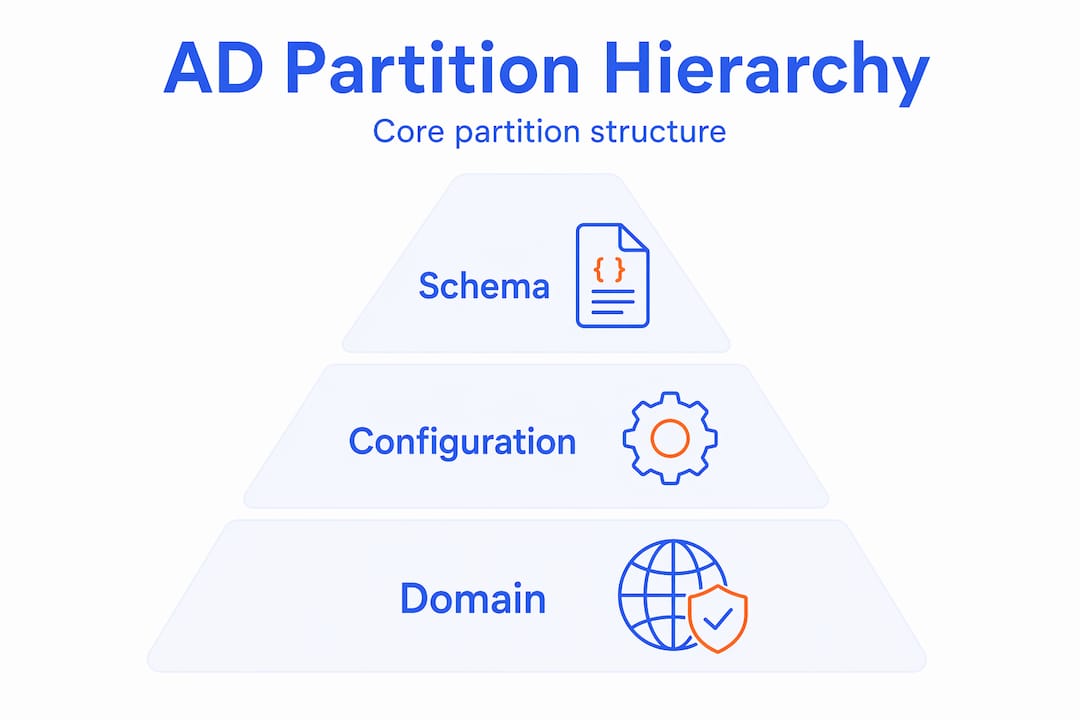
The AD database is divided into three primary directory partitions: Schema, Configuration, and Domain. Each one stores a specific category of data, replicates to a specific set of domain controllers, and serves a distinct purpose in the forest architecture. Understanding this separation is the foundation of every meaningful AD troubleshooting session.
Schema partition
The Schema partition defines every object class and attribute that can exist in Active Directory. Think of it as the blueprint. When you extend the schema to support Exchange or Lync, those changes land here. This partition replicates forest-wide, meaning every domain controller in every domain holds a copy. Only the Schema Master FSMO role holder can write to it.
Because schema changes are permanent and forest-wide, a botched schema extension is one of the hardest problems to recover from. There is no rollback button. Testing schema changes in a lab before production is not optional in any serious enterprise environment.
Configuration partition
The Configuration partition stores forest-wide topology and service configuration data. This includes site and subnet definitions, site links, service connection points, PKI templates, and certificate authority containers. Like the Schema partition, it replicates to all domain controllers across the entire forest.
The practical implication is significant. A misconfiguration in the Configuration partition does not affect just one domain. It affects every domain in the forest simultaneously. This is why changes to site topology, PKI infrastructure, or service registration deserve careful planning and change control.
Domain partition
The Domain partition is where the objects you interact with daily live: users, computers, groups, printers, and Group Policy Objects. Every domain in the forest maintains its own Domain partition, and it replicates only to domain controllers within that specific domain. A domain controller in Domain A does not receive Domain B’s Domain partition data.

| Partition | Replication scope | Typical contents |
|---|---|---|
| Schema | Forest-wide | Object classes, attribute definitions |
| Configuration | Forest-wide | Sites, subnets, PKI, service data |
| Domain | Domain-only | Users, computers, groups, GPOs |
Pro Tip: Use “ntdsutilor the Active Directory Sites and Services console to verify partition replication status. Runningrepadmin /showrepl` gives you a fast read on which partitions are replicating cleanly across your domain controllers.
Application directory partitions
Beyond the three core partitions, Active Directory supports a fourth category: application directory partitions. These are custom partitions that administrators or applications create to store data that needs to replicate, but only to a specific subset of domain controllers rather than the entire domain or forest.
The most common example you will encounter is DNS. DNS zones stored in application partitions replicate only to domain controllers that host the DNS Server role. Windows Server automatically creates two default DNS application partitions when you integrate DNS with Active Directory:
- ForestDnsZones: Replicates to all DNS-enabled domain controllers in the forest.
- DomainDnsZones: Replicates to all DNS-enabled domain controllers within a specific domain.
This design matters for replication efficiency. Before application partitions existed, DNS data was stored in the Domain partition, which meant every domain controller received DNS zone data regardless of whether it ran DNS. That created unnecessary replication traffic and storage overhead on DCs that had no use for the data.
Application partitions also appear in other Microsoft products. Active Directory Lightweight Directory Services (AD LDS) uses them extensively for application-specific directory data that does not belong in the main AD database. Third-party applications can create their own application partitions as well, though this is less common.
Pro Tip: Run dsquery * "CN=Partitions,CN=Configuration,DC=yourdomain,DC=com" -attr name to list all partitions registered in your forest, including any application partitions you may not have known existed.
The key distinction from the core partitions is scope control. You define exactly which domain controllers participate in replicating an application partition. That flexibility makes them useful for geographically distributed environments where you want to minimize cross-site replication traffic for application-specific data.
Organizational units: management containers, not partitions
This is where most confusion in active directory structure discussions originates. Organizational Units are not directory partitions. They are containers that live inside the Domain partition. They do not have their own replication scope, and they do not represent a separate division of the AD database.
OUs exist for two purposes: applying Group Policy Objects and delegating administrative control. That is it. Structuring your OUs around anything other than those two needs creates problems down the road.
Here are the most common OU design mistakes IT teams make in enterprise environments:
- Mirroring the org chart. Departments change. Mergers happen. An OU structure built around your company’s reporting hierarchy becomes outdated within months and requires constant restructuring.
- Using OUs for access control. OUs are not security boundaries. Permissions assigned at the OU level control who can manage objects in that OU, not who can access resources those objects represent. Security groups handle access control.
- Mixing privileged and standard accounts in the same OUs. Placing Tier 0 accounts alongside standard users in the same container complicates least privilege policies and increases your attack surface significantly.
- Linking GPOs to the default Users or Computers containers. These default containers are not OUs. You cannot link a GPO to them directly. Move objects into proper OUs before applying policy.
“OUs only scope GPO application and admin delegation but provide no access control themselves.” This distinction matters every time you design a new OU or troubleshoot a GPO that is not applying as expected.
A practical enterprise OU layout separates objects by type first (Users, Computers, Service Accounts, Groups) and then by geography or business unit only when GPO or delegation requirements differ between those groups. Security groups follow the AGDLP pattern for access management, not OUs.
Pro Tip: Before restructuring OUs in production, use a staging environment to test GPO inheritance and delegation changes. Moving objects between OUs can break GPO application in ways that are not immediately obvious.
Replication mechanics and troubleshooting
Understanding how partitions replicate is what separates an administrator who can fix AD problems from one who just reboots domain controllers and hopes for the best.
Schema and Configuration partitions replicate forest-wide. Every domain controller in the forest, regardless of domain, maintains a copy of both. Domain partitions replicate only within their own domain. Application partitions replicate to whatever subset of DCs you configure. These scopes directly determine where you look when something breaks.
Active Directory site topology is the mechanism that controls how and when replication happens between domain controllers in different physical locations. Sites map to IP subnets, and site links define the replication schedule and cost between them. When replication fails or performs poorly, the first place to check is whether your site and subnet definitions accurately reflect your network. Incorrect site topology inputs cause poor replication and authentication performance. The fault is in the configuration, not in Active Directory itself.
| Symptom | Likely partition involved | Where to look |
|---|---|---|
| GPO not applying | Domain partition | Replication status within domain |
| Site topology not updating | Configuration partition | Forest-wide replication, site link config |
| Schema extension not visible | Schema partition | Schema Master replication, forest-wide DC sync |
| DNS zone missing on some DCs | DNS application partition | DNS role presence on affected DCs |
Common replication pitfalls worth knowing:
- Lingering objects: Domain controllers that have been offline longer than the tombstone lifetime can reintroduce deleted objects when they reconnect. This affects Domain partitions most often.
- USN rollback: Restoring a domain controller from a snapshot without proper AD-aware procedures causes update sequence number inconsistencies that break replication.
- Stale site links: Site links left over from decommissioned offices or network changes cause replication to route inefficiently or fail entirely.
Pro Tip: repadmin /replsummary gives you a high-level view of replication health across all partitions. Pair it with dcdiag /test:replications to identify which specific partition is experiencing failures on which domain controller.
Understanding AD attack methods that exploit replication weaknesses, such as DCSync attacks, also requires knowing which partition holds what. DCSync abuses Domain partition replication rights. If an account has replication permissions it should not have, an attacker can pull password hashes without touching a domain controller directly.
My take on AD partition design in the real world
I have worked with Active Directory environments ranging from single-domain SMBs to multi-forest enterprises spanning dozens of countries. The single most consistent source of pain I have seen is not a technical failure. It is a design failure that happened years before anyone called it a problem.
When teams do not understand the difference between partitions and OUs, they build structures that feel logical at first but become impossible to manage at scale. I have seen organizations with 400-level OU nesting, GPOs linked at every level, and no documentation explaining why. Untangling that takes months, and it creates security gaps while you do it.
The Configuration partition is the one that scares me most in enterprise environments. Because it replicates forest-wide, a bad change there has no blast radius limit. I have seen a single misconfigured certificate template in AD CS take down authentication for an entire organization because nobody understood that the Configuration partition does not respect domain boundaries.
Intentional AD design upfront prevents the kind of costly misconfigurations that require emergency change windows at 2 AM. Tools that let you simulate and visualize your AD structure before committing changes to production are worth every minute you spend learning them. The shift from reactive discovery to deliberate design is the most important change I have seen in how mature IT teams manage Active Directory.
My practical advice: document your partition replication topology, keep your site and subnet definitions current, and treat any change to the Schema or Configuration partition with the same rigor you would apply to a production database schema change. Because that is exactly what it is.
— ANTONIO
Take your AD management further with Core365
If this breakdown of Active Directory partitions clarified some long-standing confusion, there is a lot more where that came from. Core365 publishes in-depth technical content specifically for IT professionals managing complex Windows environments. You will find detailed guides on AD attack methods that exploit partition and OU misconfigurations, along with practical walkthroughs for hardening your environment. The Core365 blog also covers PowerShell automation for AD reporting, monitoring, and troubleshooting tasks that would otherwise take hours to do manually. If you are managing Active Directory at scale and want resources that go beyond surface-level explanations, Core365 is worth bookmarking.
FAQ
What are the three primary Active Directory partitions?
The three primary partitions are Schema, Configuration, and Domain. Schema and Configuration partitions replicate forest-wide, while the Domain partition replicates only within its own domain.
How are OUs different from directory partitions?
Organizational Units are containers within the Domain partition used for GPO application and admin delegation. They are not separate partitions and have no independent replication scope.
What is an application directory partition?
An application directory partition is a custom partition that replicates to a defined subset of domain controllers. DNS application partitions are the most common example, replicating DNS zones only to DCs running the DNS Server role.
Why does the Configuration partition matter for troubleshooting?
Because the Configuration partition replicates forest-wide, any misconfiguration there affects every domain in the forest simultaneously. Issues with site topology, PKI templates, or service data all trace back to this partition.
How do I check Active Directory partition replication health?
Run repadmin /replsummary for a high-level overview and repadmin /showrepl for detailed per-partition replication status across your domain controllers.
Recommended
- Top 10 Active Directory Attack Methods Explained – Core365 Cloud PowerShell Blog
- Fixing Active Directory Time Drift in Hybrid/Virtualized Environments (The Definitive Troubleshooting & Remediation Guide) – Core365 Cloud PowerShell Blog
- Core365 Cloud PowerShell Blog – IT Automation with PowerShell & AD
- How to Install and Configure Microsoft LAPS (Local Administrator Password Solution) – Core365 Cloud PowerShell Blog

Antonio Rennvick is an IT Infrastructure Manager with 15+ years running enterprise Active Directory, Microsoft 365, and Azure environments. He’s Microsoft certified (AZ-104, MS-102) and writes Core365 Cloud to share what actually works in production—PowerShell automation, AD deep dives, and security hardening drawn from real-world work, not test labs.