
Last Updated: July 2026
Answer capsule: Active Directory legacy auth deprecation in 2026 covers three separate but overlapping changes: CVE-2026-20833 forces domain controllers toward AES-SHA1 Kerberos tickets and away from RC4, NTLMv1 continues its multi-year phase-out through enhanced auditing, and Windows Server 2025 enables LDAP signing by default on brand-new AD deployments. None of these require you to upgrade to Server 2025 to be affected. The RC4 change lands through ordinary Windows Update on Server 2019, 2022, and 2025 alike.
Table of Contents
- What’s Actually Changing in 2026
- The Enforcement Timeline
- How Kerberos Ticket Issuance Changes
- NTLMv1 Deprecation: The Slower-Moving Threat
- LDAP Signing Enforcement in Windows Server 2025
- Comparison Table: Server 2019/2022 vs Server 2025 Defaults
- Detection Toolkit: Finding What Will Break First
- Troubleshooting Table: Symptoms, Root Cause, Fix
- Remediation Playbook
- A Real-World Lesson From the Lab
- The Core365 Detection Toolkit (Free Script)
- Frequently Asked Questions
What’s Actually Changing in 2026
Active Directory legacy auth deprecation in 2026 is not one change. It is three separate hardening efforts landing in roughly the same window, and mixing them up is the fastest way to misdiagnose an outage. Therefore, before touching a single GPO, it helps to separate them clearly.
The first is CVE-2026-20833, a Kerberos vulnerability tied to the continued use of RC4 encryption for service ticket issuance. The second is the long-running NTLMv1 deprecation effort, which predates Server 2025 by several years. The third is LDAP signing enforcement, which changes the default posture of brand-new Active Directory deployments built on Windows Server 2025. Each has a different trigger, a different blast radius, and a different fix.
CVE-2026-20833: The RC4 Kerberoasting Vulnerability
CVE-2026-20833 is an information-disclosure vulnerability in Windows Kerberos. In short, it exists because RC4-encrypted service tickets are far weaker against offline cracking than AES-encrypted tickets. An authenticated attacker can request a service ticket for any valid Service Principal Name, and if the Key Distribution Center still issues that ticket using RC4, the attacker can capture it and attempt to crack the service account’s password offline. This technique is widely known as Kerberoasting, and it has been a staple of internal penetration tests and real-world breaches for years.
As a result, Microsoft is closing the door on RC4 as an implicit fallback. Instead of quietly accepting RC4 when AES isn’t available, domain controllers patched against this issue increasingly demand AES-SHA1 by default. Consequently, any account still carrying RC4-only Kerberos keys becomes visible – and eventually unauthenticatable – once enforcement fully lands.
Why Microsoft Is Killing the RC4 Fallback
RC4 has been supported in Windows Kerberos since Windows 2000, largely for backward compatibility. However, every supported version of Windows since Server 2008 has been capable of AES128-SHA96 and AES256-SHA96 encryption. In other words, the compatibility justification for RC4 largely disappeared over a decade ago – what’s left is inertia: old service account passwords that were never reset, appliances that were never patched, and configurations nobody remembers writing.
The Enforcement Timeline
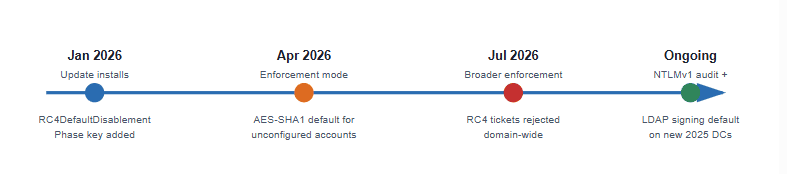
The rollout for CVE-2026-20833 happens in phases, gated by a registry value rather than by which OS version you’re running. This distinction matters enormously for planning, since it means the change reaches you through Windows Update, not through a Server 2025 in-place upgrade.
January 2026 – The Update Lands
Starting with the January 2026 cumulative updates, a new registry value called RC4DefaultDisablementPhase becomes available under the KDC’s Kerberos parameters. Once that update is installed and the domain controller is restarted, the KDC begins reading this value to decide how strictly to enforce AES-only behavior. Importantly, installing the update alone does not break anything immediately – it simply arms the mechanism.
April and July 2026 – Enforcement Milestones
By April 2026, Microsoft shifts the default value of DefaultDomainSupportedEncTypes so that accounts without an explicit encryption configuration are assumed to support AES-SHA1 only. Meanwhile, July 2026 marks a broader enforcement step. So, if your domain still has RC4-only accounts by then, expect authentication failures – not because you upgraded an OS, but because the patch level on your existing DCs reached this milestone.
How Kerberos Ticket Issuance Changes
To troubleshoot this properly, it helps to see exactly where the decision gets made. The diagram below shows the simplified flow a domain controller follows when a client requests a Ticket Granting Ticket.
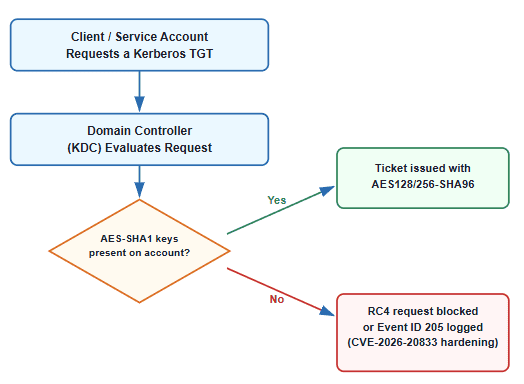
msDS-SupportedEncryptionTypes Explained
msDS-SupportedEncryptionTypes is an attribute on every user and computer account that tells the KDC which encryption types that account supports. It’s a decimal value built from bit flags: 4 for RC4, 8 for AES128-SHA96, and 16 for AES256-SHA96, among others. Consequently, an account showing a value like 28 supports RC4, AES128, and AES256 together, while an account showing 4 alone is RC4-only and firmly on the risk list.
DefaultDomainSupportedEncTypes and the New 0x18 Default
When an account has no explicit value set for msDS-SupportedEncryptionTypes, it inherits the domain-wide default, controlled by DefaultDomainSupportedEncTypes. As part of this hardening wave, Microsoft is changing that default to 0x18, which represents AES-SHA1 only. In practice, this means silence is no longer safe – accounts that never had an opinion about encryption type will suddenly be AES-only by default, whether or not anyone explicitly configured them that way.
NTLMv1 Deprecation: The Slower-Moving Threat
Unlike the RC4 change, NTLMv1 deprecation has been a multi-year Microsoft initiative that predates Windows Server 2025 by a wide margin. However, it deserves equal attention because it is often the quieter, more embedded risk – baked into old printers, POS systems, and applications nobody has touched since deployment.
Why NTLMv1 Is Still Dangerous
NTLMv1 relies on a challenge-response protocol built around DES encryption, which is considered cryptographically broken by modern standards. NTLMv2, by contrast, adds more inputs to the challenge and uses HMAC-MD5 – not perfect, but meaningfully stronger. As a result, NTLMv1 remains far more susceptible to relay and man-in-the-middle attacks, since captured challenge-response pairs can be brute-forced offline with commodity hardware.
LmCompatibilityLevel and Where It Lives
The setting that governs this behavior is LmCompatibilityLevel, configurable via Group Policy under Security Options as “Network security: LAN Manager authentication level.” Level 5 is the end state most hardening guides recommend, since it restricts domain controllers to NTLMv2 only and refuses NTLMv1 outright. Getting there safely, though, requires auditing first – blindly setting level 5 without visibility into what’s still using NTLMv1 is a reliable way to break something you didn’t know depended on it.
LDAP Signing Enforcement in Windows Server 2025
This is the piece most often confused with the other two, so it’s worth being precise. LDAP signing enforcement is genuinely new behavior introduced with Windows Server 2025 – but its trigger is different from the RC4 change.
What Changes for New Domain Controllers
Starting with Windows Server 2025, all new Active Directory deployments require LDAP signing by default. This is controlled through a new policy, “Domain controller: LDAP server signing requirements enforcement,” which takes precedence over the older LDAP signing policy that existed in prior Windows Server versions. In addition, LDAP channel binding defaults to “When supported,” and channel binding auditing is enabled out of the box – meaning a fresh 2025 DC starts logging Event ID 3039 for channel-binding-relevant activity from day one.
What Stays the Same on In-Place Upgrades
Here’s the detail that gets lost in most discussions of this topic: if you upgrade an existing domain controller in place to Windows Server 2025, your existing LDAP signing policy is preserved to prevent disruption. In other words, an in-place OS upgrade does not silently start rejecting unsigned binds on its own. The real exposure comes from deploying brand-new Server 2025 domain controllers into an environment, or from anyone explicitly touching the enforcement policy.
Comparison Table: Server 2019/2022 vs Server 2025 Defaults
| Setting | Server 2019 / 2022 Default | Server 2025 Default (new deployments) |
|---|---|---|
| LDAP server signing requirement | Optional (None) unless client requires it | Required by default via enforcement policy |
| LDAP channel binding | Disabled unless explicitly configured | “When supported” by default |
| Channel binding auditing | Not enabled by default | Enabled by default (Event ID 3039) |
| DefaultDomainSupportedEncTypes | Includes RC4 + AES-SHA1 | Moving to AES-SHA1 only (0x18) via update, independent of OS version |
| In-place upgrade behavior | N/A | Existing LDAP signing policy preserved, not overwritten |
| RC4 Kerberos hardening scripts available | Yes (via update) | Yes |
Detection Toolkit: Finding What Will Break First
Detection has to happen before remediation, and every part of this deprecation wave leaves a trail in the event logs – provided auditing is turned on ahead of time. Below is the walkthrough for each of the three areas.
Auditing RC4 and Kerberos Encryption Usage
Start by enabling success auditing for Kerberos Authentication Service (Event 4768) and Kerberos Service Ticket Operations (Event 4769) on all domain controllers. Then, use Microsoft’s official Kerberos-Crypto scripts to translate those events into something readable:
# Enumerate the actual keys available per account from the event log
.\List-AccountKeys.ps1

# See which encryption types Kerberos is negotiating right now
.\Get-KerbEncryptionUsage.ps1

# Filter specifically for RC4-encrypted requests
.\Get-KerbEncryptionUsage.ps1 -Encryption RC4
Additionally, check any specific account directly:
Get-ADObject -Filter "Name -eq 'SVC-BACKUP' -and (ObjectClass -eq 'Computer' -or ObjectClass -eq 'User')" `
    -Properties "msds-SupportedEncryptionTypes"
Auditing NTLM and LmCompatibilityLevel
Enable the “Network security: Restrict NTLM: Audit NTLM authentication in this domain” policy, then review the NTLM operational log:
Get-WinEvent -LogName "Microsoft-Windows-NTLM/Operational" |
    Where-Object { $_.Id -eq 8004 } |
    Select-Object TimeCreated, Message
Cross-reference the results against your current LmCompatibilityLevel setting to understand how much room you have before raising it toward level 5.
Auditing LDAP Signing and Channel Binding
Enable NTDS diagnostic logging for LDAP interface events, then watch for the summary and detail events:
reg add "HKLM\SYSTEM\CurrentControlSet\Services\NTDS\Diagnostics" /v "16 LDAP Interface Events" /t REG_DWORD /d 2

Get-WinEvent -LogName "Directory Service" |
    Where-Object { $_.Id -in 2887, 2888, 3039 }
Event 2887 is particularly efficient, since it summarizes unsigned and simple bind counts once every 24 hours – a fast way to confirm exposure without wading through per-bind detail.
Troubleshooting Table: Symptoms, Root Cause, Fix
| Symptom | Likely Root Cause | Fix |
|---|---|---|
| Service suddenly fails to authenticate after a patch cycle | Account only has RC4 keys; domain default flipped to AES-only | Reset the account password to provision AES128/256-SHA96 keys |
| Event ID 205 appearing in Security log | KDC was asked to issue an RC4 ticket under enforcement mode | Identify the requesting account/device and remediate encryption support |
| Third-party appliance can’t bind to AD after standing up a new DC | New Server 2025 DC enforcing LDAP signing by default; appliance uses unsigned bind | Configure LDAPS on the appliance or explicitly relax the enforcement policy short-term |
| Legacy printer/scanner fails SMB or LDAP auth | Device hardcoded to NTLMv1 or unsigned LDAP | Firmware update if available, or isolate the device on a legacy-auth exception path |
| Cross-forest trust intermittently fails authentication | Trust object’s msDS-SupportedEncryptionTypes not explicitly set | Review and explicitly configure encryption types on the trust object |
| Non-Windows Kerberos client stops authenticating | Device/OS predates AES-SHA1 Kerberos support | Migrate the device, or as a documented insecure last resort, explicitly re-enable RC4 with AES session keys on that one account |
Remediation Playbook
Fixing RC4-Only Accounts
Once an account is confirmed RC4-only, the fix is refreshingly simple: reset its password. Doing so automatically provisions AES128-SHA96 and AES256-SHA96 keys in Active Directory, since modern DCs generate all supported key types at password-set time. For service accounts, coordinate the reset with the application owner to avoid a surprise outage from cached credentials.
Handling Non-Windows Devices That Can’t Support AES
If a legitimate device genuinely cannot support AES-SHA1, Microsoft’s documented (if explicitly insecure) fallback is to configure that specific account’s msDS-SupportedEncryptionTypes to permit RC4 with AES session keys, rather than reverting the entire domain’s default. This narrows the exposure to one account instead of reopening the door domain-wide. Long-term, though, the only real fix is replacing or upgrading the device.
Preparing for LDAP Signing Before Adding New 2025 DCs
Before introducing any new Windows Server 2025 domain controller, run a full inventory of everything that binds to AD via plain LDAP – VPN concentrators, monitoring tools, HR systems, custom scripts. Enable LDAPS on each where possible. Only after that inventory is clean should the new 2025 DC join the environment, since its default behavior assumes signed communication from day one.
A Real-World Lesson From the Lab
In my testing, the most common mistake isn’t technical – it’s sequencing. A common mistake I see is teams enabling NTDS diagnostic logging and Kerberos auditing for a day or two, seeing a quiet result, and concluding the environment is clean. However, legacy authentication dependencies frequently only surface on monthly or quarterly batch jobs: a backup job that runs once a month, a reporting script that fires at quarter-end, a legacy printer firmware check that only phones home occasionally. As a result, a proper audit window should span at least two to four full weeks, ideally crossing a month-end boundary, before you trust a “clean” result enough to flip an enforcement setting.
The Core365 Detection Toolkit (Free Script)
To make this easier, I built a consolidated PowerShell auditor that pulls all three exposure areas – RC4 accounts, NTLM usage, and LDAP signing events – into a single HTML summary plus five CSV exports. It is read-only and makes no configuration changes on its own.
.\Get-LegacyAuthExposure.ps1 -OutputPath "C:\Reports" -DaysBack 14
The full script and README are available on GitHub, linked at the end of this post. Run it weekly through the April and July 2026 milestones to watch your exposure count trend toward zero. In addition, this guide on building a full Active Directory health check dashboard pairs well with it if you want a broader forest-wide view alongside legacy-auth exposure.
Frequently Asked Questions
What is CVE-2026-20833?
CVE-2026-20833 is a Kerberos vulnerability related to RC4-encrypted service ticket issuance. It enables easier Kerberoasting attacks against service accounts, prompting Microsoft to phase out RC4 as a default encryption fallback in Active Directory.
Will upgrading to Windows Server 2025 break Kerberos authentication?
Not directly. The RC4 encryption change is delivered through Windows Update, not through the Server 2025 upgrade itself. Upgrading and patching are related but separate events on your timeline.
Does the RC4 Kerberos change affect Server 2019 and 2022 too?
Yes. The January 2026 updates and subsequent enforcement milestones apply to Server 2019, 2022, and 2025 alike, since the change targets the KDC service, not a specific OS version.
What is Kerberoasting and how does RC4 make it worse?
Kerberoasting is a technique where an attacker requests a service ticket and attempts to crack it offline to recover the service account’s password. RC4 encryption is significantly faster to brute-force than AES, making Kerberoasting far more practical against RC4-encrypted tickets.
How do I find accounts still using RC4 in my domain?
Enable Kerberos success auditing for events 4768 and 4769, then run Microsoft’s List-AccountKeys.ps1 and Get-KerbEncryptionUsage.ps1 scripts from the official Kerberos-Crypto GitHub repository to identify affected accounts.
What is msDS-SupportedEncryptionTypes?
It’s an attribute on user and computer accounts that defines which Kerberos encryption types that account supports, stored as a decimal value built from bit flags for RC4, AES128, and AES256.
How do I fix an account that only has RC4 keys?
Reset the account’s password. This automatically provisions AES128-SHA96 and AES256-SHA96 keys in Active Directory, resolving the RC4-only condition without further configuration.
What is DefaultDomainSupportedEncTypes and how do I check it?
It’s the domain-wide default encryption type setting applied to accounts without an explicit configuration. Microsoft is changing this default to AES-SHA1 only (0x18) as part of the 2026 hardening effort.
Is NTLMv1 disabled automatically in Windows Server 2025?
No. NTLMv1 deprecation is a longer-running, policy-driven effort. Server 2025 improves auditing visibility, but disabling NTLMv1 still requires administrators to raise LmCompatibilityLevel deliberately.
What is LDAP signing and does Server 2025 enforce it automatically?
LDAP signing digitally signs LDAP messages to prevent tampering and replay attacks. Server 2025 enforces it by default only for brand-new Active Directory deployments, not for existing domain controllers upgraded in place.
Will an in-place upgrade to Server 2025 change my LDAP signing policy?
No. Existing LDAP signing policies are preserved during an in-place upgrade specifically to prevent disruption. The stricter default only applies when standing up new 2025 domain controllers.
What Event IDs should I monitor for RC4 and unsigned LDAP binds?
Monitor Kerberos events 4768 and 4769 for RC4 ticket usage, Event 205 for blocked RC4 requests under enforcement, and Directory Service events 2887, 2888, and 3039 for unsigned LDAP binds and channel binding activity.
What’s the safest way to prepare my Active Directory domain for these changes?
Enable auditing for all three areas weeks in advance, run a full audit cycle spanning at least a month, remediate RC4-only accounts via password resets, and inventory unsigned LDAP clients before deploying any new Server 2025 domain controller.
For deeper context on how these changes intersect with credential-based attacks more broadly, see Top 10 Active Directory Attack Methods Every Security Professional Must Know, and if you suspect an environment has already been compromised via legacy authentication paths, review Active Directory Backdoor Removal Steps in 2026. If trust relationships are part of your exposure, this companion guide on Active Directory Trust Relationship Failed: Root Causes, Symptoms, and Prevention covers the broader troubleshooting picture, and for pre-authentication mechanics specifically, see Asymmetric Pre-Authentication in Ticket Granting Ticket (TGT) Requests in Active Directory.
Sources: Microsoft Support: Managing Kerberos KDC RC4 usage for CVE-2026-20833, Microsoft Windows Server Blog: Beyond RC4 for Windows Authentication, and Microsoft Learn: Manage LDAP Signing Using Group Policy.

Antonio Rennvick is an IT Infrastructure Manager with 15+ years running enterprise Active Directory, Microsoft 365, and Azure environments. He’s Microsoft certified (AZ-104, MS-102) and writes Core365 Cloud to share what actually works in production—PowerShell automation, AD deep dives, and security hardening drawn from real-world work, not test labs.

Hello,
I don’t see the script link and I can’t find it on github
Red.
I have included the link that was broken earlier.
https://github.com/arennvick/Core365-Legacy-Authentication-Exposure-Auditor.git