

Persistent backdoors in Active Directory don’t disappear when you reset a password or patch a vulnerability. Attackers design them to survive exactly that kind of response. Following proper active directory backdoor removal steps requires a coordinated sequence of technical actions, not a single fix. This guide covers the full process: preparation, execution, and verification, with specific attention to the persistence mechanisms that most incident response teams miss, including AdminSDHolder abuse, shadow credentials, and Kerberos ticket survival after credential rotation.
Table of Contents
- Key takeaways
- Active directory backdoor removal steps: preparation
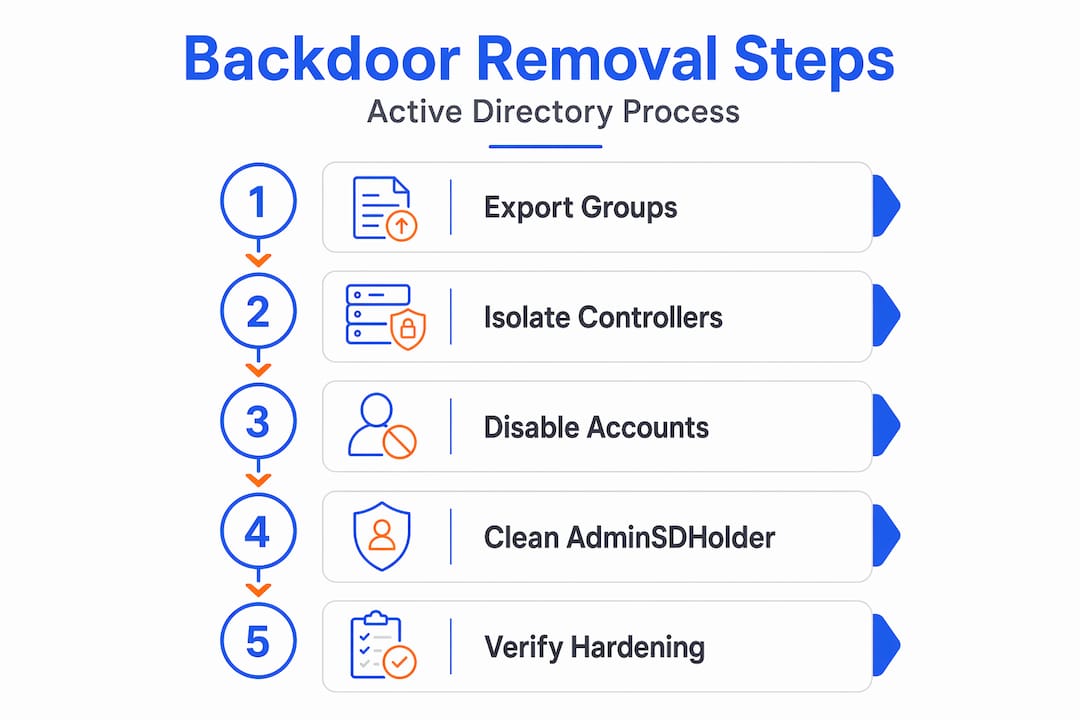
- Step-by-step backdoor removal process
- Common pitfalls during removal
- Verification and post-removal hardening
- What I have learned from real AD backdoor removals
- How Core365 can support your AD security work
- FAQ
Key takeaways
| Point | Details |
|---|---|
| Password resets are not enough | Cached Kerberos tickets keep attackers active until tickets expire or are forcibly invalidated. |
| AdminSDHolder re-infects every hour | Dirty ACLs propagate to protected groups every 60 minutes if AdminSDHolder is not cleaned first. |
| krbtgt needs two rotations | A single password change leaves residual tickets valid; two rotations fully invalidate all sessions. |
| PowerShell beats UI tools | Shadow credentials and AD CS abuses require script-based detection that ADUC cannot perform. |
| Hardening must follow removal | Tiered admin models and MFA on privileged accounts prevent reinfection after cleanup. |
Active directory backdoor removal steps: preparation
Before you touch a single account or ACL, you need a clean baseline and a controlled environment. Rushing into removal without preparation is how teams accidentally break replication, lock out legitimate admins, or miss secondary persistence mechanisms entirely.
Personnel and systems checklist:
- At least one Domain Admin with a known-clean, freshly provisioned account
- A dedicated forensic workstation not joined to the compromised domain
- Read access to all domain controllers for audit log collection
- A documented list of all privileged groups: Domain Admins, Enterprise Admins, Schema Admins, and Backup Operators
Toolkit requirements:
- PowerShell 5.1 or higher with the ActiveDirectory module
- BloodHound or a comparable AD attack path analysis tool for mapping persistence
- Microsoft’s AD Replication Status Tool for replication health checks
- A SIEM or log aggregation platform with at least 90 days of retained AD event logs
Before any changes, run a full export of all group memberships, ACLs on sensitive OUs, and the AdminSDHolder container permissions. This baseline gives you a comparison point after cleanup. Microsoft recommends disabling accounts with no logons for 90 days as a baseline reduction of attack surface, so pull that report now and flag every stale account.
Isolate affected domain controllers from internet-facing systems if possible. This limits lateral movement while you work. Do not start removal on a live, fully connected environment without at least network-level segmentation in place.
Pro Tip: Run “Get-ADUser -Filter {Enabled -eq $true} -Properties LastLogonDate | Where-Object {$_.LastLogonDate -lt (Get-Date).AddDays(-90)}` before you start. You will almost always find accounts that have no business being active.
Step-by-step backdoor removal process
This is the core of the work. Follow these steps in order. Skipping or reordering them creates gaps that attackers can exploit.
- Disable stale and compromised accounts. Pull every account flagged as inactive for over 90 days and disable it immediately. Do the same for any account identified in your forensic analysis as compromised. Do not delete accounts yet. Disabling preserves audit trails while removing access.
- Stop AD replication temporarily. Pausing replication isolates bad changes and prevents malicious objects or ACL modifications from propagating to other domain controllers while you clean. Use
repadmin /options DC_NAME +DISABLE_OUTBOUND_REPLon each DC you are actively remediating. - Audit and clean AdminSDHolder. This step is non-negotiable. The SDProp process re-applies ACLs from the AdminSDHolder container to all protected groups every 60 minutes. If an attacker added a backdoor ACL to AdminSDHolder, it will reinfect your environment on the next propagation cycle regardless of what else you clean. Use the AD AdminSDHolder Toolkit to enumerate and remove unauthorized ACEs. Compare against your pre-incident baseline.
- Remove unauthorized accounts from privileged groups. Audit Domain Admins, Enterprise Admins, and Schema Admins manually. Remove any account that cannot be verified as legitimate. Pay attention to accounts with generic names, service-account-style names in privileged groups, and accounts created during the suspected compromise window.
- Clear shadow credentials and AD CS abuses. Attackers exploit misconfigured certificate templates and register shadow credentials to maintain persistence without needing a password. Standard UI tools like ADUC will not surface these. Use PowerShell with the
Get-ADUser -Properties msDS-KeyCredentialLinkattribute to identify shadow credential registrations and remove unauthorized entries. For AD CS, audit certificate templates withCertify.exe find /vulnerableor equivalent and revoke any certificates issued to attacker-controlled principals. - Rotate the krbtgt account password twice. This is one of the most critical active directory security steps in the entire process. A two-stage rotation invalidates all existing Kerberos tickets and prevents reuse of stolen credentials. Wait at least the maximum Kerberos ticket lifetime (default 10 hours) between the first and second rotation to allow replication to complete. Skipping the second rotation leaves residual tickets valid.
- Resume AD replication and verify. Once cleanup is complete on all domain controllers, re-enable replication and monitor for any unexpected changes in the first 24 hours. Replication resumption is your first real test of whether the environment is clean.
Pro Tip: Document every change with a timestamp and the responsible admin account. This log becomes your evidence trail and your rollback reference if something breaks post-cleanup.
| Removal step | Primary tool | Risk if skipped |
|---|---|---|
| AdminSDHolder cleanup | PowerShell / AD Toolkit | Re-infection every 60 minutes |
| krbtgt double rotation | Active Directory Users | Residual Kerberos ticket access |
| Shadow credential removal | PowerShell scripts | Persistent certificate-based access |
| Stale account disabling | PowerShell / AD module | Dormant access vectors remain open |
| Replication pause | repadmin | Malicious objects spread to all DCs |

Common pitfalls during removal
Most organizations get tripped up by the same set of mistakes. Knowing them in advance saves hours of re-remediation.
Password resets create a false sense of security. Cached credentials and active Kerberos tickets allow attackers to stay active even after you reset a compromised account’s password. The ticket remains valid until it expires or you force revocation. This is why the krbtgt rotation and explicit session invalidation are required steps, not optional ones.
Relying on UI tools misses modern persistence. Advanced persistence mechanisms like shadow credentials require script-based auditing to detect and remove. If your team is using only ADUC or the graphical Group Policy Management Console to verify cleanup, you are almost certainly leaving persistence in place.
Ignoring SDProp timing causes immediate reinfection. If you clean privileged group ACLs before cleaning AdminSDHolder, SDProp will restore the backdoor ACLs within the hour. Always clean AdminSDHolder first.
Failing to monitor LDAP query patterns post-cleanup. Behavioral detection of LDAP reconnaissance is more effective than signature-based detection for identifying residual attacker activity. After cleanup, watch for unusual LDAP queries against sensitive attributes, especially from service accounts or workstations that have no business querying those objects.
Eliminating malware in Active Directory is not a one-time event. Attackers who have had persistent access for weeks or months have likely mapped your environment thoroughly. Assume they have fallback mechanisms you have not found yet, and build your monitoring accordingly.
Verification and post-removal hardening
Cleaning the environment is only half the job. Without hardening, you are removing the current backdoor and leaving the door open for the next one.
Verification steps:
- Re-run your BloodHound collection and compare attack paths against the pre-incident baseline
- Confirm AdminSDHolder ACLs match your approved template
- Verify krbtgt password last-set timestamps show two recent changes
- Check all privileged group memberships against your documented baseline
- Review AD CS templates for any remaining misconfigurations using Certify or PSPKIAudit
Hardening measures to implement immediately:
- Deploy a tiered administrative model that segments Tier 0 (domain controllers, AD infrastructure), Tier 1 (servers), and Tier 2 (workstations) to confine any future compromise
- Enforce MFA on all accounts with Domain Admin or equivalent privileges
- Set up real-time change alerts on AdminSDHolder, privileged group membership, and krbtgt password changes
- Schedule quarterly AdminSDHolder audits using a GPO change audit report to catch drift before it becomes a breach
- Plan krbtgt password rotations every 180 days as a standing operational procedure, not just a post-incident action
Pro Tip: Automate your privileged group membership report with a scheduled PowerShell task that emails a diff against the approved baseline every Monday morning. You will catch unauthorized additions within days instead of months.
Modern AD attacks exploit design misconfigurations rather than traditional software vulnerabilities. Hardening is not about patching. It is about removing the architectural weaknesses that make these attacks possible in the first place.
What I have learned from real AD backdoor removals
I have worked through enough Active Directory compromises to say this plainly: the teams that struggle most are the ones that treat removal as a checklist rather than an investigation. They reset passwords, remove the obvious rogue account, and declare victory. Three weeks later, the attacker is back.
The AdminSDHolder issue is the one that catches experienced teams off guard most often. I have seen environments where the cleanup team correctly identified and removed a backdoor ACL from Domain Admins, only to watch it return the next morning. They assumed reinfection. It was SDProp doing exactly what it was designed to do, restoring the dirty ACL from an AdminSDHolder container nobody had touched.
The krbtgt double rotation also gets shortchanged. Teams do one rotation, check that the password changed, and move on. But session-based Kerberos tickets allow continued access post-password reset until tickets expire or are invalidated. One rotation is not enough. The second rotation, timed correctly, is what actually terminates attacker sessions.
My strongest recommendation: do not attempt these steps without understanding AD attack methods at the same level of depth as the attacker. You cannot remove what you do not understand. Automation helps, but judgment about what is legitimate and what is malicious still requires a human who knows the environment.
— ANTONIO
How Core365 can support your AD security work
If you are working through an Active Directory incident or building out a proactive security program, Core365 has the technical depth to back you up. The Core365 blog covers AD attack methods, PowerShell-based auditing scripts, and step-by-step incident response guides that go well beyond what you find in vendor documentation.
Core365 publishes detailed breakdowns of persistence techniques like shadow credentials and AD CS exploitation, along with ready-to-use PowerShell toolkits for automating privilege audits and change tracking. Whether you are in the middle of a cleanup or hardening against the next attack, the Core365 PowerShell blog gives you the specific, technical guidance that generic security resources skip. Start with the AD attack methods library and work outward from there.
FAQ
What are the first steps to remove an AD backdoor?
Start by disabling compromised and stale accounts, then pause AD replication to contain the damage. Clean AdminSDHolder before touching any privileged group ACLs to prevent SDProp from restoring backdoor permissions.
Why does rotating the krbtgt password require two changes?
A single rotation leaves existing Kerberos tickets valid until they expire naturally. The second rotation invalidates all residual tickets, ensuring no attacker session can persist using previously issued credentials.
How do you find shadow credentials in Active Directory?
Use PowerShell to query the msDS-KeyCredentialLink attribute on user objects. Standard UI tools like ADUC do not surface these entries, so script-based auditing is required to detect and remove shadow credential-based persistence.
What is AdminSDHolder and why does it matter for backdoor removal?
AdminSDHolder is a special AD container whose ACLs are automatically copied to all protected groups every 60 minutes by the SDProp process. If an attacker modifies AdminSDHolder, those changes will reinfect your environment repeatedly until the container itself is cleaned.
How do you prevent Active Directory backdoors after removal?
Implement a tiered administrative model, enforce MFA on all privileged accounts, and set up real-time alerts on AdminSDHolder and privileged group changes. Schedule regular krbtgt rotations and automated membership audits to catch unauthorized changes before they become persistent threats.
Recommended
- Top 10 Active Directory Attack Methods Explained – Core365 Cloud PowerShell Blog
- Fixing Active Directory Time Drift in Hybrid/Virtualized Environments (The Definitive Troubleshooting & Remediation Guide) – Core365 Cloud PowerShell Blog
- Core365 Cloud PowerShell Blog – IT Automation with PowerShell & AD
- Asymmetric Pre-Authentication in Ticket Granting Ticket (TGT) requests in Active Directory – Core365 Cloud PowerShell Blog
https://blog.core365.cloud/break-glass-account-active-directory

Antonio Rennvick is an IT Infrastructure Manager with 15+ years running enterprise Active Directory, Microsoft 365, and Azure environments. He’s Microsoft certified (AZ-104, MS-102) and writes Core365 Cloud to share what actually works in production—PowerShell automation, AD deep dives, and security hardening drawn from real-world work, not test labs.
