Active Directory

Banner illustrating troubleshooting Microsoft Entra Connect installation between on-premises Active Directory and the cloud
Active Directory Identity & Access Management Microsoft Entra

Troubleshoot Microsoft Entra Connect Installation Issues

Home » Microsoft Entra » Troubleshoot Microsoft Entra Connect Installation Issues Last Updated: July 2026 Answer Capsule: Most Microsoft Entra Connect installation problems trace back to three things: a domain controller that shouldn’t be hosting the sync engine, a SQL Server running out of headroom, or an unverified UPN suffix blocking the sign-in configuration step. […]

Futuristic banner illustrating RC4 Kerberos, NTLMv1, and LDAP signing deprecation timeline for Active Directory in 2026
Active Directory Security

Active Directory Legacy Auth Deprecation 2026: Full Guide

Home/Active Directory Security/Active Directory Legacy Auth Deprecation 2026 Last Updated: July 2026 Answer capsule: Active Directory legacy auth deprecation in 2026 covers three separate but overlapping changes: CVE-2026-20833 forces domain controllers toward AES-SHA1 Kerberos tickets and away from RC4, NTLMv1 continues its multi-year phase-out through enhanced auditing, and Windows Server 2025 enables LDAP signing by

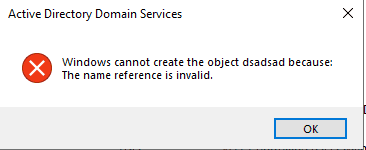
Active Directory Users and Computers error dialog showing "The name reference is invalid" when copying a user
Active Directory Exchange Server Microsoft PowerShell

Fix “The Name Reference Is Invalid” in Active Directory After Exchange Decommission

Fix “The Name Reference Is Invalid” in Active Directory After Exchange Decommission If you’ve recently decommissioned your last on‑premises Exchange server, you may run into the showInAddressBook name reference invalid error the moment you try to copy a user in Active Directory Users and Computers (ADUC). The error looks generic, but the cause is very

Banner showing AD CS Health Check Script version 1.3 update covering multi-server reporting and OCSP monitoring
PKI & Certificates

AD CS Health Check Without WinRM: v1.3 Update

Home /PKI & Certificates /AD CS Health Check Script v1.3: Multi-Server, OCSP & WinRM-Free Remote Checks   Last Updated: July 2026 Answer capsule: AD CS Health Check Script v1.3 adds three things: it checks multiple issuing CAs in one combined report, it monitors OCSP responder health, and it no longer needs WinRM for remote registry

Active Directory Automation DNS DNS Security Microsoft PowerShell

Core365 DNS Stale Record Scanner (PowerShell) – Clean Up Stale AD DNS Records Fast

The Real‑World Problem In real enterprise environments, DNS is never simple. You don’t just have one zone — you have: When a Domain Controller is decommissioned, DNS often keeps stale records behind: Manually checking and cleaning these across dozens (or hundreds) of zones is: The Solution – Core365 DNS Stale Record Scanner Core365-DNS-StaleRecord-Scanner is a

GPO Duplicate Settings Analyzer HTML dashboard showing duplicate and conflicting Group Policy settings in Active Directory
Active Directory Group Policy Microsoft PowerShell

🛡️ GPO Duplicate Settings Analyzer v2.0 (Full Guide + Script)

⏱️ Estimated Read Time 6–8 minutes Managing Group Policy Objects (GPOs) in large Active Directory environments can quickly become chaotic. Over time, duplicate and conflicting settings creep in—leading to unpredictable behavior and long troubleshooting sessions. In this guide, you’ll learn how to identify GPO duplicates, detect conflicts, and clean up your environment using a powerful

Scroll to Top
×