PowerShell

Learn PowerShell scripting, automation, and command-line management to streamline administration across Windows, Azure, and Microsoft 365 environments.

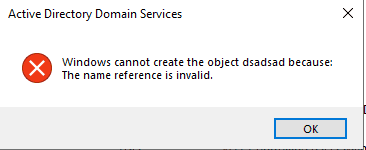
Active Directory Users and Computers error dialog showing "The name reference is invalid" when copying a user
Active Directory Exchange Server Microsoft PowerShell

Fix “The Name Reference Is Invalid” in Active Directory After Exchange Decommission

Fix “The Name Reference Is Invalid” in Active Directory After Exchange Decommission If you’ve recently decommissioned your last on‑premises Exchange server, you may run into the showInAddressBook name reference invalid error the moment you try to copy a user in Active Directory Users and Computers (ADUC). The error looks generic, but the cause is very […]

Active Directory Automation DNS DNS Security Microsoft PowerShell

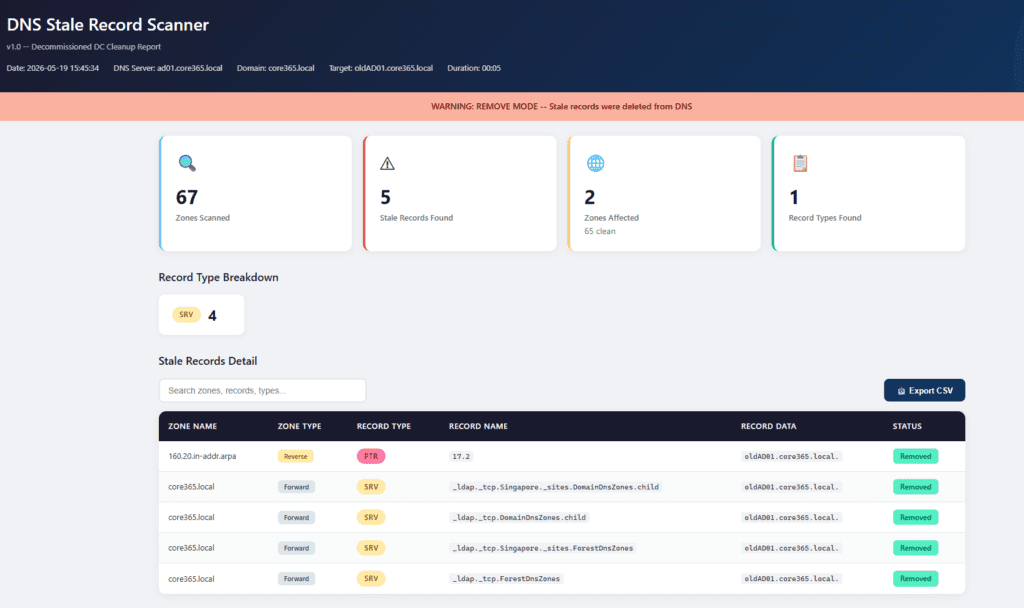
Core365 DNS Stale Record Scanner (PowerShell) – Clean Up Stale AD DNS Records Fast

The Real‑World Problem In real enterprise environments, DNS is never simple. You don’t just have one zone — you have: When a Domain Controller is decommissioned, DNS often keeps stale records behind: Manually checking and cleaning these across dozens (or hundreds) of zones is: The Solution – Core365 DNS Stale Record Scanner Core365-DNS-StaleRecord-Scanner is a

GPO Duplicate Settings Analyzer HTML dashboard showing duplicate and conflicting Group Policy settings in Active Directory
Active Directory Group Policy Microsoft PowerShell

🛡️ GPO Duplicate Settings Analyzer v2.0 (Full Guide + Script)

⏱️ Estimated Read Time 6–8 minutes Managing Group Policy Objects (GPOs) in large Active Directory environments can quickly become chaotic. Over time, duplicate and conflicting settings creep in—leading to unpredictable behavior and long troubleshooting sessions. In this guide, you’ll learn how to identify GPO duplicates, detect conflicts, and clean up your environment using a powerful

Feature image for a real-time Active Directory replication dashboard built with PowerShell and HTML, showing live topology view, site-to-site summary, failed and stale replication links, and auto-refreshing dashboard health metrics.
Active Directory Automation Microsoft PowerShell

🚀 Real-Time Active Directory Replication Dashboard (PowerShell)

⏱️ Estimated Read Time – 6–8 minutes Active Directory replication issues are one of the most common hidden causes of outages, authentication failures, and inconsistent policies in enterprise environments. Yet most tools used today: 👉 That’s exactly why I built this: A real-time AD Replication Dashboard powered by PowerShell + HTML that transforms raw replication

Find caller computer causing repeated Active Directory account lockouts using Event ID 4740 report
Active Directory Automation PowerShell Security

Stop Repeated Active Directory Lockouts: Find the Caller Computer (Event ID 4740) with a PowerShell HTML + Email Report

If you’ve ever dealt with “my account is locked again” tickets, you know the real pain isn’t unlocking the account — it’s finding what keeps locking it. When a user gets locked out in Active Directory, the key investigative signal is Windows Security Event ID 4740 (“A user account was locked out”). [techpress.net] 💻 Download

Active Directory health check PowerShell HTML dashboard
Active Directory Identity & Access Management Microsoft PowerShell Windows Server

Active Directory Health Check with PowerShell – Full Forest Report & Interactive HTML Dashboard

Active Directory Health Check with PowerShell + HTML Dashboard Run a complete Active Directory health check using PowerShell and automatically generate a clean, readable HTML dashboard. This guide shows you how to assess domain health, replication status, and critical AD services using a simple script. Whether you’re a system administrator or IT engineer, this automated

Scroll to Top
×