
Fix “The Name Reference Is Invalid” in Active Directory After Exchange Decommission
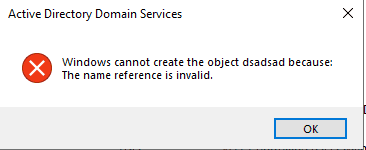
If you’ve recently decommissioned your last on‑premises Exchange server, you may run into the showInAddressBook name reference invalid error the moment you try to copy a user in Active Directory Users and Computers (ADUC). The error looks generic, but the cause is very specific — and the fix is quick once you understand what’s going on.
In this article, I’ll walk through why the showInAddressBook name reference invalid error appears after Exchange decommission, how to identify the stale attribute values, and a production‑ready PowerShell script you can use for bulk cleanup. I’ll also cover safety in hybrid environments and answer the most common FAQs.
What Is showInAddressBook?
showInAddressBook is a multi‑valued, Distinguished Name (DN) linked attribute on user, group, and contact objects in Active Directory. Each value is a DN pointing to an Exchange Address List container under:
CN=<Address List>,CN=All Address Lists,CN=Address Lists Container,
CN=<Org>,CN=Microsoft Exchange,CN=Services,CN=Configuration,DC=<domain>
Exchange writes these DNs on every mail‑enabled recipient so Outlook and the GAL know which address lists the object belongs to — for example: Default Global Address List, All Users, All Recipients (VLV), All Mail Users (VLV).
Why the showInAddressBook Name Reference Invalid Error Happens
When you uninstall the last Exchange server, the Exchange configuration objects in CN=Configuration — including Address List containers like Default Global Address List, All Users, All Recipients (VLV), and All Mail Users (VLV) — are deleted.
However, two things are not cleaned up:
- The Exchange schema extensions remain in AD forever. That’s by design.
- The DN back‑references already written to
showInAddressBookon every existing user object are left behind. They now point to tombstoned objects underCN=Deleted Objects,CN=Configuration,….
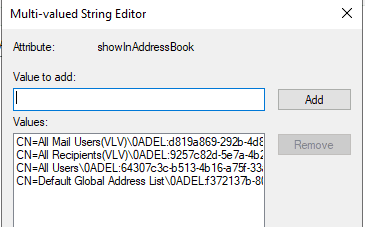
You can spot these stale DNs easily — they carry a \0ADEL:<GUID> suffix, which is AD’s standard tombstone naming format:
CN=Default Global Address List\0ADEL:f372137b-80c0-46b0-993e-69431de6368f,
CN=Deleted Objects,CN=Configuration,DC=example,DC=com
What ADUC “Copy” Actually Does
When you copy a user, ADUC performs an LDAP Add on a new object and copies certain attributes from the source — including showInAddressBook. Because this is a DN‑syntax linked attribute, AD validates every DN value at write time. When AD resolves those DNs and finds they point to deleted objects, the write fails with:
ERROR_DS_NAME_REFERENCE_INVALID — “The name reference is invalid.”
That’s the entire root cause.
How to Identify the showInAddressBook Values Causing the Invalid Reference
Open ADUC → Enable Advanced Features → Open a user’s properties → Attribute Editor tab → look for showInAddressBook.
Any value containing \0ADEL: is stale and can be removed.
Or, using PowerShell:
Get-ADUser -Filter * -Properties showInAddressBook |
    Where-Object { $_.showInAddressBook -match '\\0ADEL:' } |
    Select-Object SamAccountName, DistinguishedName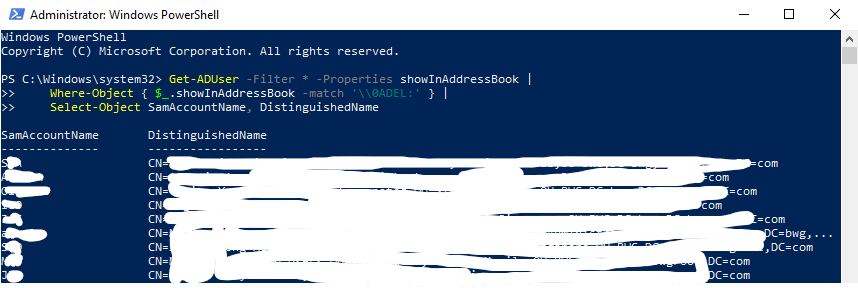
The Quick Fix — Single User
For a one‑off fix, you can clear the stale values manually:
- Open ADUC with Advanced Features enabled.
- Open the user’s properties → Attribute Editor.
- Find
showInAddressBook→ click Edit. - Remove each entry containing
\0ADEL:→ click OK. - Try the Copy action again — it will now succeed.
For anything more than a handful of users, use the bulk PowerShell approach below.
The Right Fix — Bulk Cleanup for the showInAddressBook Name Reference Invalid Error
Below is a production‑ready script that:
- Takes a CSV export of current values (safety net).
- Clears
showInAddressBookfor all users in a specified scope. - Produces a post‑change verification CSV.
- Writes a transcript log for audit evidence.
🖥️ PowerShell Script — Bulk showInAddressBook Cleanup
<#
.SYNOPSIS
    Cleans up stale showInAddressBook values in Active Directory after Exchange decommission.

.DESCRIPTION
    Exports current values as a backup CSV, clears the attribute, and produces a
    post-change verification CSV plus a transcript log.

.NOTES
    - Run on a Domain Controller or admin workstation with RSAT.
    - Requires Domain Admin (or delegated) privileges.
    - Test in a pilot OU before running domain-wide.
#>

# ---------------- CONFIG ----------------
# Set to a specific OU DN for pilot, or "" (empty) to target the whole domain.
$SearchBase = "OU=Pilot,OU=Users,DC=example,DC=com"

$OutputDir  = "C:\Temp\AD_showInAddressBook_Cleanup"
$Timestamp  = Get-Date -Format "yyyyMMdd_HHmmss"
$BackupCsv  = Join-Path $OutputDir "BEFORE_$Timestamp.csv"
$ClearLog   = Join-Path $OutputDir "ClearResults_$Timestamp.csv"
$AfterCsv   = Join-Path $OutputDir "AFTER_$Timestamp.csv"
$LogFile    = Join-Path $OutputDir "Transcript_$Timestamp.log"

# ---------------- PREP ----------------
if (-not (Test-Path $OutputDir)) { New-Item -ItemType Directory -Path $OutputDir | Out-Null }
Start-Transcript -Path $LogFile -Append
Import-Module ActiveDirectory

$scopeParam = @{ Filter = '*'; Properties = 'showInAddressBook','DistinguishedName' }
if ($SearchBase) { $scopeParam['SearchBase'] = $SearchBase }

# ---------------- BACKUP ----------------
Write-Host "Exporting current showInAddressBook values..." -ForegroundColor Cyan
$backup = Get-ADUser @scopeParam |
    Where-Object { $_.showInAddressBook } |
    ForEach-Object {
        foreach ($dn in $_.showInAddressBook) {
            [PSCustomObject]@{
                SamAccountName    = $_.SamAccountName
                UserDN            = $_.DistinguishedName
                showInAddressBook = $dn
                IsTombstoned      = ($dn -match '\\0ADEL:')
                ExportedAt        = (Get-Date).ToString('s')
            }
        }
    }
$backup | Export-Csv -Path $BackupCsv -NoTypeInformation -Encoding UTF8
Write-Host "Backup saved: $BackupCsv" -ForegroundColor Green

# ---------------- CONFIRM ----------------
$confirm = Read-Host "Type 'YES' to clear showInAddressBook for the scoped users"
if ($confirm -ne 'YES') {
    Write-Host "Cancelled by operator." -ForegroundColor Red
    Stop-Transcript; return
}

# ---------------- CLEAR ----------------
$results = @()
$users   = Get-ADUser @scopeParam | Where-Object { $_.showInAddressBook }

foreach ($u in $users) {
    $count = $u.showInAddressBook.Count
    try {
        Set-ADUser -Identity $u -Clear showInAddressBook -ErrorAction Stop
        $results += [PSCustomObject]@{
            SamAccountName = $u.SamAccountName
            UserDN         = $u.DistinguishedName
            ValuesRemoved  = $count
            Status         = 'SUCCESS'
            Error          = ''
            Timestamp      = (Get-Date).ToString('s')
        }
        Write-Host "  Cleared $count values from $($u.SamAccountName)" -ForegroundColor Green
    } catch {
        $results += [PSCustomObject]@{
            SamAccountName = $u.SamAccountName
            UserDN         = $u.DistinguishedName
            ValuesRemoved  = 0
            Status         = 'FAILED'
            Error          = $_.Exception.Message
            Timestamp      = (Get-Date).ToString('s')
        }
        Write-Warning "  FAILED on $($u.SamAccountName): $($_.Exception.Message)"
    }
}
$results | Export-Csv -Path $ClearLog -NoTypeInformation -Encoding UTF8

# ---------------- VERIFY ----------------
Write-Host "Running post-change verification..." -ForegroundColor Cyan
Get-ADUser @scopeParam |
    Select-Object SamAccountName,
                  DistinguishedName,
                  @{n='HasShowInAddressBook';e={[bool]$_.showInAddressBook}},
                  @{n='ValueCount';e={($_.showInAddressBook | Measure-Object).Count}} |
    Export-Csv -Path $AfterCsv -NoTypeInformation -Encoding UTF8

# ---------------- SUMMARY ----------------
$success = ($results | Where-Object Status -eq 'SUCCESS').Count
$failed  = ($results | Where-Object Status -eq 'FAILED').Count

Write-Host ""
Write-Host "==================== SUMMARY ====================" -ForegroundColor Green
Write-Host "Users processed         : $($results.Count)"
Write-Host "Successful clears       : $success"
Write-Host "Failed clears           : $failed"
Write-Host "Backup CSV              : $BackupCsv"
Write-Host "Clear results CSV       : $ClearLog"
Write-Host "Post-change CSV         : $AfterCsv"
Write-Host "=================================================" -ForegroundColor Green

Stop-Transcript
Is It Safe in a Hybrid Environment?
Yes — in nearly every modern setup. Here’s a mapping of what actually reads showInAddressBook:
| 🧩 Component | 🔍 Reads showInAddressBook? | 📊 Impact of Clearing |
|---|---|---|
| Entra Connect (AAD Connect) | ❌ Not included in the default synchronization attribute set | None |
| Exchange Online GAL |
❌ Controlled by
msExchHideFromAddressLists /
HiddenFromAddressListsEnabled | None |
| Microsoft Intune | ❌ Uses Entra ID attributes only | None |
| Conditional Access / MFA | ❌ Not related | None |
| On-Prem Exchange | ✅ Would use the attribute, but no longer applicable | None |
| On-Prem AD (Authentication, GPO, LAPS) | ❌ Not related | None |
The attribute is essentially orphaned metadata once on‑premises Exchange is gone.
Rollback Considerations
Always take the BEFORE CSV as an evidence artefact. But be honest with yourself about what “rollback” actually means here:
- Because the stale DNs point to deleted objects, writing them back triggers the same “name reference is invalid” error you’re trying to fix.
- True revertability would require restoring the deleted Address List objects from AD Recycle Bin or a system state backup — which defeats the whole purpose of decommissioning Exchange.
In practice, the CSV serves as:
- Audit evidence for your change record.
- A best‑effort restore for any DN that still resolves to a live object (unlikely, but useful if a mistake was made in scoping).
Older accounts created while Exchange was active tend to have the showInAddressBook attribute populated. Newer accounts, especially those created after decommission, may not have any values at all — so copying them works fine.
showInAddressBook synced to Entra ID by Entra Connect?No. It is not part of the default attribute set that Entra Connect syncs to Entra ID or Exchange Online.
No. GAL visibility in Exchange Online is controlled by HiddenFromAddressListsEnabled on the cloud mailbox (or msExchHideFromAddressLists on‑prem), not by showInAddressBook.
No. None of these services read showInAddressBook. They rely on Entra ID attributes such as department, city, extensionAttribute*, and device state.
Only partially. The exported CSV is preserved as evidence, but any DN pointing to a tombstoned object cannot be written back — that’s the exact condition that triggered the original error. Enabling AD Recycle Bin before making changes is always a good general‑purpose safety net.
Yes, if you use “copy” operations on them or if you want a fully clean directory. The same PowerShell logic works — just swap Get-ADUser for Get-ADGroup or Get-ADObject -LDAPFilter "(objectClass=contact)".
No. The attribute is not synced, so there’s no need to pause sync. However, running a delta sync immediately after cleanup is a good validation step to confirm nothing unexpected exports.
showInAddressBook?Check the manager attribute on the source user. If it points to a user in another domain that ADUC can’t resolve, the same “name reference is invalid” error appears. Clearing manager before copying will resolve it.
No. Only Exchange populates it, and you no longer have Exchange on‑prem. Once cleared, it stays cleared.
Not without schema modifications. The cleanest approach is to remove the stale values (as described above) or, better yet, move away from the copy user provisioning pattern and use a script‑based or IAM‑driven user provisioning process instead.
Conclusion
The “name reference is invalid” error after Exchange decommission is almost always caused by tombstoned DN references stuck inside the showInAddressBook attribute. Clearing them is safe in hybrid environments, quick to execute, and permanently resolves the ADUC copy issue.
The showInAddressBook name reference invalid error after Exchange decommission is almost always caused by tombstoned DN references stuck inside the showInAddressBook attribute. Clearing them is safe in hybrid environments, quick to execute, and permanently resolves the ADUC copy issue.
If you found this useful, connect with me and follow more real‑world enterprise IT troubleshooting posts on https://core365.cloud.

Antonio Rennvick is an IT Infrastructure Manager with 15+ years running enterprise Active Directory, Microsoft 365, and Azure environments. He’s Microsoft certified (AZ-104, MS-102) and writes Core365 Cloud to share what actually works in production—PowerShell automation, AD deep dives, and security hardening drawn from real-world work, not test labs.
