
Introduction
Modern enterprises rarely operate within a single Microsoft Entra tenant. Mergers, acquisitions, regional compliance boundaries, and sovereign cloud requirements frequently necessitate multi‑tenant identity architectures. Historically, organizations relied on manual Azure AD B2B invitations or custom scripts to manage cross‑tenant access, leading to identity sprawl, inconsistent security enforcement, and stale guest accounts.
Microsoft Entra cross‑tenant synchronization addresses these challenges by introducing a native, policy‑driven provisioning engine that automatically creates, updates, and removes B2B users (and now groups) across trusted tenants. [learn.microsoft.com]
This article provides a technical deep dive into:
- Cross‑tenant synchronization architecture
- Configuration lifecycle and attribute flows
- Licensing and entitlement requirements
- Security, governance, and attack surface considerations
- Operational monitoring and best practices
What Is Cross‑Tenant Synchronization?
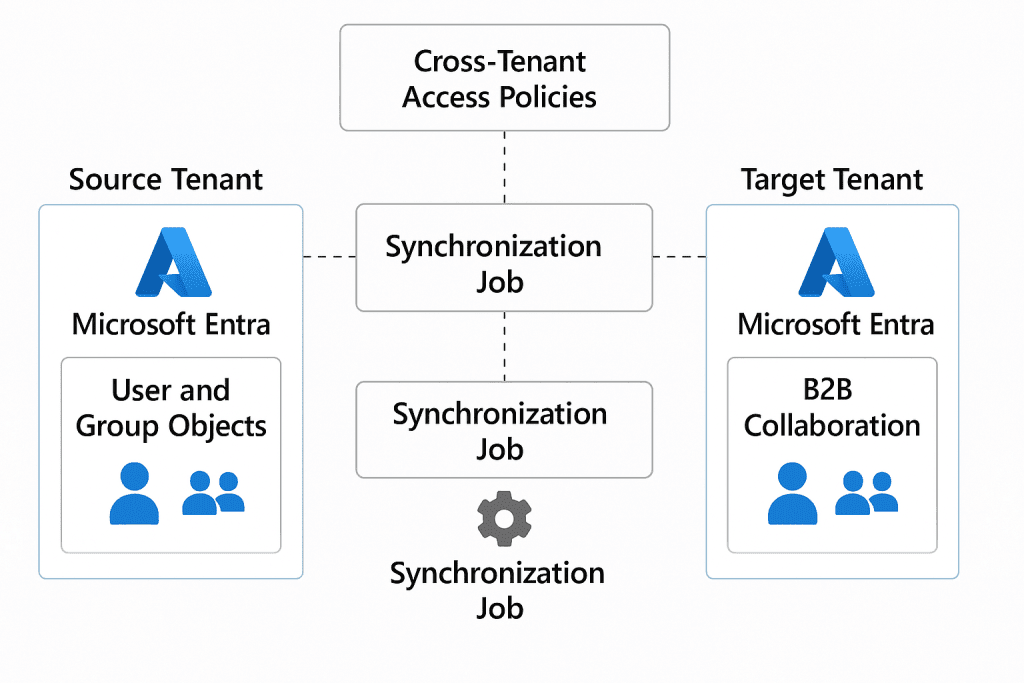
Cross‑tenant synchronization is a push‑based identity provisioning service built on top of the Microsoft Entra provisioning engine. It enables a source tenant to provision user and group objects into a target tenant as B2B collaboration accounts, without requiring invitation emails or interactive consent flows. [learn.microsoft.com]
Key characteristics:
- Source‑controlled provisioning scope and attributes
- Automatic lifecycle management (create, update, delete)
- No credential duplication (users authenticate in their home tenant)
- Works across same‑cloud and cross‑cloud boundaries
Unlike traditional B2B invitations, cross‑tenant sync continuously enforces identity state, ensuring that termination or role changes propagate automatically to all connected tenants. [thetechtrails.com]
Architectural Overview
At an architectural level, cross‑tenant synchronization uses the same service that provisions SaaS applications in Entra ID.

Core Components
- Provisioning Service Principal
- Automatically created during enablement
- Uses delegated permissions and cross‑tenant policy trust
- Cross‑Tenant Access Policies
- Define inbound and outbound trust relationships
- Control automatic redemption, MFA trust, and device trust
- Synchronization Job
- Executes on a ~40‑minute cycle
- Processes only scoped users/groups
- Attribute Mapping Schema
- Defines object matching and transformations
- Supports extension attributes and expressions
This architecture ensures a one‑way trust model: the source tenant controls identity flow, while the target tenant controls authorization and Conditional Access enforcement. [learn.microsoft.com]
Supported Scenarios and Cloud Pairs
Cross‑tenant synchronization supports both same‑cloud and cross‑cloud deployments:
| Source Cloud | Target Cloud |
|---|---|
| Commercial | Commercial |
| Commercial | US Government (GCCH, DoD) |
| US Government | Commercial |
| Commercial | China (21Vianet) |
Cross‑cloud synchronization requires additional licensing and explicit enablement in Microsoft Cloud Settings. [m365admin….sontek.net]
Licensing and Role Requirements
Licensing (Source Tenant)
| Feature | Required License |
|---|---|
| User synchronization (same cloud) | Entra ID P1 or P2 |
| Group synchronization | Entra ID Governance or Entra Suite |
| Cross‑cloud synchronization | Entra ID Governance / Suite |
No licenses are required in the target tenant, unless additional premium features are used. [bing.com]
Administrative Roles
- Security Administrator – Cross‑tenant access settings
- Hybrid Identity Administrator – Synchronization configuration
- Application Administrator – Assigning users and managing sync jobs
Configuration Workflow (Technical Summary)
1. Enable Cross‑Tenant Access
Both tenants must explicitly configure inbound and outbound access policies, including:
- Allow user (and optional group) synchronization
- Enable automatic redemption
- Configure trust for MFA and device claims
This step establishes the trust boundary required for provisioning jobs to run. [bing.com]
2. Create Synchronization Configuration
In the source tenant:
- Create a new synchronization configuration
- Set provisioning mode to Automatic
- Authenticate using Cross‑Tenant Synchronization Policy
This creates a dedicated service principal scoped only to the target tenant. [learn.microsoft.com]
3. Define Scope and Filters
Best practice is to:
- Select Sync only assigned users and groups
- Assign a pilot group
- Apply attribute‑based scoping filters (e.g.,
department eq "Engineering")
Scoping reduces blast radius and accelerates sync cycles.
4. Attribute Mapping and Transformations
Key attributes:
alternativeSecurityIdentifier(immutable, matching key)userType(Member vs Guest)displayName,mail,jobTitle
Transformations use Entra expression syntax, enabling:
- Domain suffix tagging
- Naming normalization
- Extension attribute mapping. [bing.com]
5. Start and Monitor Provisioning
Once started:
- Initial sync may take hours
- Incremental cycles run automatically
- Logs available through Provisioning Logs and Audit Logs
Failures trigger quarantine and optional email alerts.
Group Synchronization (Preview)
Microsoft introduced cross‑tenant group synchronization to address access governance gaps where permissions are group‑driven. This feature:
- Provisions security and Microsoft 365 groups
- Synchronizes membership (direct members only)
- Requires Governance licensing
It remains in preview and should be deployed cautiously in production. [bing.com]
Security and Governance Considerations
Cross‑tenant synchronization introduces implicit trust paths that must be secured.
Key Risks
- Over‑privileged guest accounts
- Trusted MFA/device claims from compromised tenants
- Lateral movement via persistent sync relationships
Security researchers have demonstrated real‑world abuse of cross‑tenant paths using Microsoft Graph enumeration and misconfigured policies. [bing.com]
Hardening Best Practices
- Scope synchronization using least privilege
- Require MFA and device compliance trust selectively
- Monitor changes to cross‑tenant access policies
- Restrict who can administer synchronization configs
- Periodically review synced accounts and groups [bing.com]
Operational Monitoring
Effective operations rely on:
- Provisioning Logs (object‑level results)
- Audit Logs (policy and config changes)
- Microsoft Entra integration with Azure Monitor / SIEM
Administrators should treat cross‑tenant sync as a Tier‑0 identity control plane.
When to Use (and Not Use) Cross‑Tenant Synchronization
Ideal Use Cases
- Parent–child tenant models
- M&A integration without full tenant consolidation
- Sovereign cloud separation with centralized identity
- Long‑term strategic partnerships
Not Recommended When
- Trust cannot be guaranteed between tenants
- One‑time or ad‑hoc collaboration needs
- You require bi‑directional identity authority
Microsoft explicitly recommends single‑tenant consolidation where possible, using cross‑tenant sync as a transitional or structural solution. [bing.com]
Conclusion
Microsoft Entra cross‑tenant synchronization fundamentally changes how enterprises approach multi‑tenant identity governance. By shifting from invitation‑based access to continuous lifecycle management, it reduces operational overhead while improving security posture—provided it is deployed with strict governance and monitoring.
When combined with Conditional Access, entitlement management, and Zero Trust principles, cross‑tenant sync becomes a powerful identity fabric for modern, distributed organizations.

Antonio Rennvick is an IT Infrastructure Manager with 15+ years running enterprise Active Directory, Microsoft 365, and Azure environments. He’s Microsoft certified (AZ-104, MS-102) and writes Core365 Cloud to share what actually works in production—PowerShell automation, AD deep dives, and security hardening drawn from real-world work, not test labs.