
The Real‑World Problem
In real enterprise environments, DNS is never simple.
You don’t just have one zone — you have:
- multiple forward lookup zones
- reverse lookup zones
- delegated zones
- application partitions (DomainDnsZones / ForestDnsZones)
When a Domain Controller is decommissioned, DNS often keeps stale records behind:
- Old Name Server (NS) entries
- Orphaned SRV records
- Stale PTR records in reverse zones
Manually checking and cleaning these across dozens (or hundreds) of zones is:
- Time‑consing
- Error‑prone
- Risky during production changes
The Solution – Core365 DNS Stale Record Scanner
Core365-DNS-StaleRecord-Scanner is a PowerShell tool that automates this entire process.
It will:
- 🔍 Scan ALL DNS zones (forward + reverse)
- ⚠ Detect stale records linked to a decommissioned DC
- 📊 Generate a modern HTML dashboard report
- 🔎 Provide search, filtering, and export options
- 🧹 Optionally remove stale records safely
📥 Download the Script
🚀 How to Run the Script
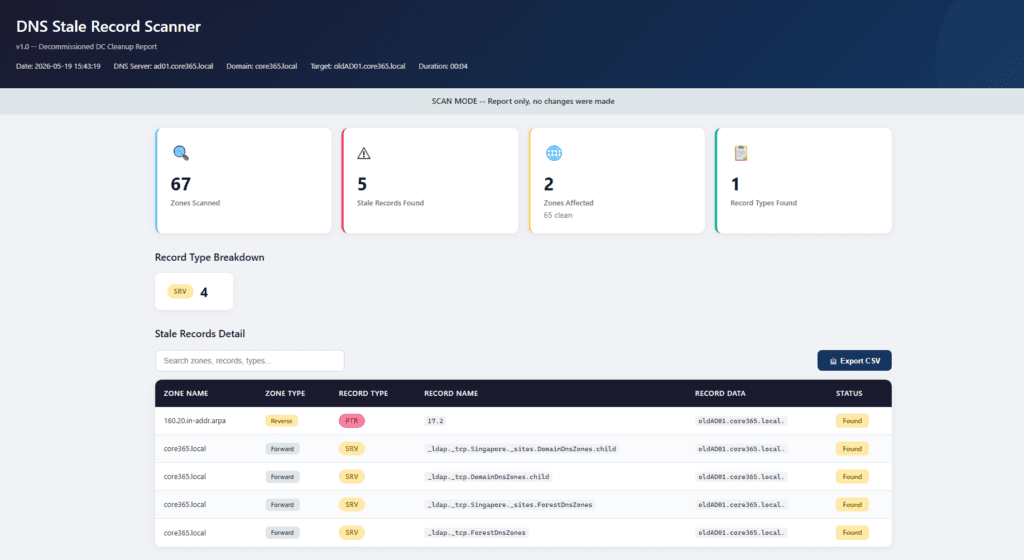
✅ 1. Scan Only (Safe Mode)
.\Core365-DNS-StaleRecord-Scanner.ps1 -OldNameServerFQDN "oldAD01.core365.local"✔ No changes
✔ Generates report only
✅ 2. Scan with IP Matching (Recommended)
.\Core365-DNS-StaleRecord-Scanner.ps1 -OldNameServerFQDN "oldAD01.core365.local" -OldIPAddress "10.10.10.10"✔ Catches A records as well
🔍 3. WhatIf Mode (Preview Changes)
.\Core365-DNS-StaleRecord-Scanner.ps1 -OldNameServerFQDN "oldAD01.core365.local" -OldIPAddress "10.10.10.10" -WhatIf✔ Shows what will be removed
✔ No actual changes
🧹 4. Remove Stale Records
.\Core365-DNS-StaleRecord-Scanner.ps1 -OldNameServerFQDN "oldAD01.core365.local" -OldIPAddress "10.10.10.10" -RemoveRecords⚠ Deletes stale DNS records
✔ Generates full report
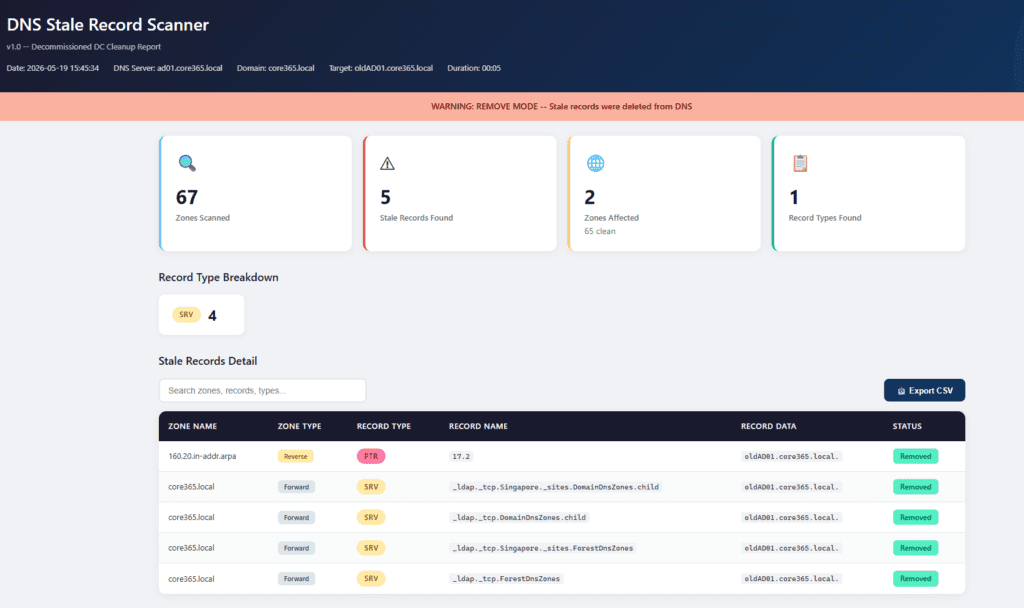
5. Confirm cleanup was performed.
.\Core365-DNS-StaleRecord-Scanner.ps1 -OldNameServerFQDN "oldAD01.core365.local"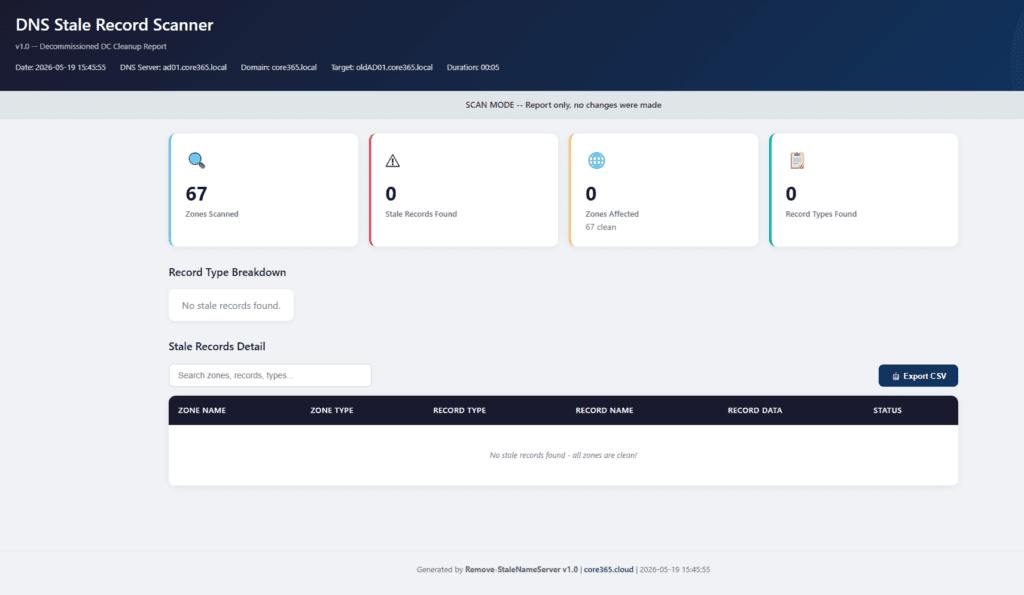
What the HTML Report Includes
Each report contains:
- Summary cards:
- Zones Scanned
- Stale Records Found
- Zones Affected
- Record Types
- Record type breakdown
- Interactive table:
- Search and filter
- Clear button (✕)
- Export CSV
Recommended Safe Workflow
Always follow this order:
- ✅ Run Scan mode
- ✅ Run WhatIf mode
- ✅ Run Remove mode
- ✅ Run Scan again (confirmation)
👉 This is audit‑safe and change‑management friendly
❓ FAQ
No — it focuses on DNS only (NS, SRV, A, AAAA, CNAME, PTR).
You should still perform AD metadata cleanup separately.
Yes. By default it uses the PDC Emulator, but you can specify:
Yes:
Scan = no changes
WhatIf = preview only
Yes — the HTML report has a built‑in Export CSV button
✅ Final Notes
This tool is built for:
- Enterprise DNS environments
- Audit and compliance
- Automation and reporting
- Real-world troubleshooting

Antonio Rennvick is an IT Infrastructure Manager with 15+ years running enterprise Active Directory, Microsoft 365, and Azure environments. He’s Microsoft certified (AZ-104, MS-102) and writes Core365 Cloud to share what actually works in production—PowerShell automation, AD deep dives, and security hardening drawn from real-world work, not test labs.
