

Introduction
Identity has become the new security perimeter. As organizations shift from on‑premises infrastructure to SaaS, IaaS, and multicloud workloads, traditional network-based security has proven insufficient. Microsoft anticipated this shift over a decade ago with the introduction of Azure Active Directory (Azure AD)—a cloud-native identity provider designed for SaaS authentication and authorization.
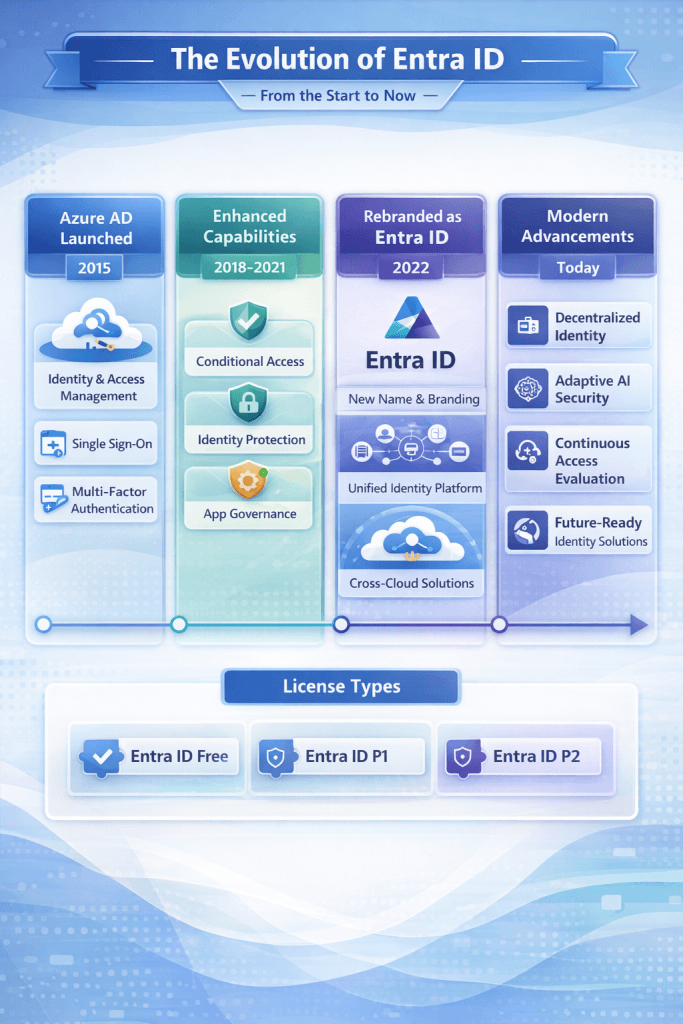
In July 2023, Microsoft rebranded Azure AD as Microsoft Entra ID, signaling not just a name change, but the formal recognition of identity as the central control plane for Zero Trust security. This article provides a deep technical evaluation of Microsoft Entra ID, tracing its evolution, architectural capabilities, security feature growth, and licensing model from inception to today. [learn.microsoft.com], [pcxio.com]
1. Origins: Azure Active Directory (2010–2014)
1.1 Purpose-Built for Cloud Identity
Azure Active Directory was introduced alongside Microsoft’s early cloud services (BPOS, later Office 365) as a cloud-based identity provider, not a domain controller replacement. Unlike Windows Server Active Directory Domain Services (AD DS), Azure AD was designed around:
- REST-based authentication
- Claims-based access (OAuth 2.0, SAML, WS-Fed)
- Internet-scale, globally distributed authentication
Azure AD removed dependencies on Kerberos, LDAP, and Group Policy, replacing them with token-based authorization for SaaS apps. [A history…d Entra ID]
1.2 Early Capabilities
Initial Azure AD capabilities included:
- Tenant-based identity stores
- User and group objects
- Directory synchronization via DirSync
- Single Sign-On (SSO) for Office 365
Security was basic—password-based authentication with minimal policy control.
2. Hybrid Identity and Enterprise Adoption (2014–2018)
2.1 Azure AD Connect and Federation
As enterprises adopted Office 365, Microsoft introduced Azure AD Connect, enabling hybrid identity by synchronizing on-prem AD objects to Azure AD. This period introduced three authentication models:
- Password Hash Sync (PHS)
- Pass-through Authentication (PTA)
- Federated Authentication (AD FS)
This allowed Azure AD to coexist with legacy AD DS environments while gradually shifting authentication control to the cloud. [inventivehq.com]
2.2 Premium Licensing Emerges
To meet enterprise security demands, Microsoft launched Azure AD Premium tiers:
- Premium P1 – Conditional Access, dynamic groups, self-service password reset
- Premium P2 – Identity Protection and Privileged Identity Management (PIM)
These tiers marked the transition from “directory service” to identity security platform.
3. Security Maturity and Zero Trust Foundations (2018–2022)
3.1 Conditional Access as Policy Engine
Conditional Access became the policy brain of Azure AD. Policies evaluate real-time signals such as:
- User risk
- Sign-in risk
- Device compliance (via Intune)
- Location and network
- Authentication strength
This allowed enforcement of Zero Trust principles: Never trust, always verify.
3.2 Identity Protection and Risk Scoring
Azure AD Identity Protection introduced machine-learning‑driven risk detection, correlating signals from Microsoft’s global telemetry to flag:
- Atypical travel
- Anonymous IP usage
- Password spray attacks
- Credential leaks
Risk-based Conditional Access became a defining feature of P2 licensing. [nexetic.com]
4. Governance and Privileged Access Evolution (2020–2023)
4.1 Privileged Identity Management (PIM)
PIM addressed standing administrative privileges by introducing:
- Just‑In‑Time (JIT) role activation
- Time-bound access
- Approval workflows
- MFA enforcement
- Audit history and alerts
PIM expanded from directory roles to Azure RBAC and group-based access (PIM for Groups). [learn.microsoft.com]
4.2 Identity Governance
Identity Governance added:
- Access Reviews
- Entitlement Management (access packages)
- Lifecycle workflows
- Automated joiner/mover/leaver processes
Governance licensing introduced “potential user” licensing, which became a common cost-planning pitfall in large tenants. [samexpert.com]
5. Rebranding to Microsoft Entra ID (2023)
5.1 Why the Rename?
Microsoft officially renamed Azure AD to Microsoft Entra ID in July 2023 to:
- Eliminate confusion with Windows Server AD
- Reflect multicloud and multiplatform scope
- Align with the broader Microsoft Entra security portfolio [bing.com], [learn.microsoft.com]
This was strictly a branding change—no migration, API changes, or functionality loss occurred.
5.2 The Microsoft Entra Product Family
Entra ID became the foundation of a larger ecosystem:
- Entra ID (core IAM)
- Entra ID Governance
- Entra ID Protection
- Entra External ID (B2B/B2C)
- Entra Permissions Management (CIEM)
- Entra Verified ID (decentralized identity)
- Entra Internet Access & Private Access (ZTNA/SWG)
6. Modern Entra ID Architecture (2024–Now)
6.1 Authentication Strengths and Contexts
Recent advancements include:
- Authentication Strengths – Policy-based MFA method enforcement (e.g., FIDO2 only)
- Authentication Contexts – Step-up authentication tied to sensitive actions or resources
These features allow precise enforcement for high-risk scenarios such as PIM role activation and sensitive SharePoint access. [bing.com], [bing.com]
6.2 Workload and External Identities
Entra ID now manages:
- Workload identities (service principals, managed identities)
- External identities (partners, customers)
- SCIM-based app provisioning
- Token protection and CAE (Continuous Access Evaluation)
Identity is no longer limited to humans.
7. Licensing Deep Dive (Current State)
7.1 Entra ID Free
Included with Azure and Microsoft 365:
- Users and groups
- Basic MFA (security defaults)
- SSO
- Directory sync
No Conditional Access or advanced security. [bing.com]
7.2 Entra ID P1
Adds:
- Conditional Access
- Dynamic groups
- Hybrid identity
- Application Proxy
- Self-service password reset
Included with Microsoft 365 E3 and Business Premium.
7.3 Entra ID P2
Adds:
- Identity Protection
- Risk-based Conditional Access
- Privileged Identity Management
- Access reviews
Included with Microsoft 365 E5. [bing.com]
7.4 Microsoft Entra Suite
A bundled offering that includes:
- Entra Private Access
- Entra Internet Access
- Entra ID Governance
- Entra ID Protection
- Verified ID Premium
The Suite is often more cost-effective than buying components individually. [samexpert.com]
8. Conclusion: Identity as the New Security Perimeter
Microsoft Entra ID has evolved from a simple cloud directory into a comprehensive identity security and access control plane. Its journey mirrors the industry’s shift from perimeter-based security to Zero Trust, where every access decision is contextual, adaptive, and continuously evaluated.
For modern enterprises, Entra ID is no longer optional—it is the backbone of authentication, authorization, governance, and security in Microsoft-centric and multicloud environments.

Antonio Rennvick is an IT Infrastructure Manager with 15+ years running enterprise Active Directory, Microsoft 365, and Azure environments. He’s Microsoft certified (AZ-104, MS-102) and writes Core365 Cloud to share what actually works in production—PowerShell automation, AD deep dives, and security hardening drawn from real-world work, not test labs.