Estimated Reading Time: 18–20 minutes
Public Key Infrastructure (PKI) has always been a necessary evil in enterprise IT—powerful, security‑critical, and operationally complex. With the introduction of Microsoft Intune Cloud PKI, Microsoft is transforming traditional PKI into a fully cloud‑native, managed service tightly integrated with endpoint management and identity.
This article provides a deep technical exploration of Intune Cloud PKI—its architecture, cryptographic foundations, certificate lifecycle, and real‑world deployment considerations.
Why Traditional PKI Is Hard
Classic PKI deployments based on Active Directory Certificate Services (AD CS) require significant operational investment:
- Offline root certification authorities (CAs)
- Highly secured issuing CAs
- Network Device Enrollment Service (NDES)
- Certificate Revocation Lists (CRLs) and AIA hosting
- Firewall rules, load balancers, and backups
A compromised or misconfigured CA can lead to total trust collapse across the enterprise. Microsoft Cloud PKI removes the need to maintain this infrastructure while preserving cryptographic assurance.
What Is Microsoft Intune Cloud PKI?
Microsoft Intune Cloud PKI is a PKI‑as‑a‑Service offering built directly into Intune. It allows organizations to create, manage, and operate public key infrastructure without deploying any on‑premises servers.
- Cloud‑hosted Root and Issuing CAs
- Integrated SCEP enrollment service
- Automated issuance, replacement, and revocation
- No NDES, no Intune certificate connector
Supported Platforms and Use Cases
Cloud PKI supports all major Intune-managed platforms:
- Windows
- macOS
- iOS / iPadOS
- Android
Common scenarios include certificate‑based Wi‑Fi (802.1X), VPN authentication, device identity, and Zero Trust access.
Cloud PKI Architecture Overview
Cloud PKI replaces traditional PKI components with Microsoft‑managed services running in Azure:
- Root CA (cloud‑hosted)
- Issuing CA (cloud‑hosted)
- Integrated SCEP service
- Azure Managed Hardware Security Modules (HSMs)
- Hosted CRL and AIA endpoints
Root CA vs Issuing CA
Cloud PKI supports a two‑tier hierarchy:
- Root CA: Trust anchor, self‑signed, distributed via Trusted Root profiles
- Issuing CA: Signs end‑entity certificates used by devices and users
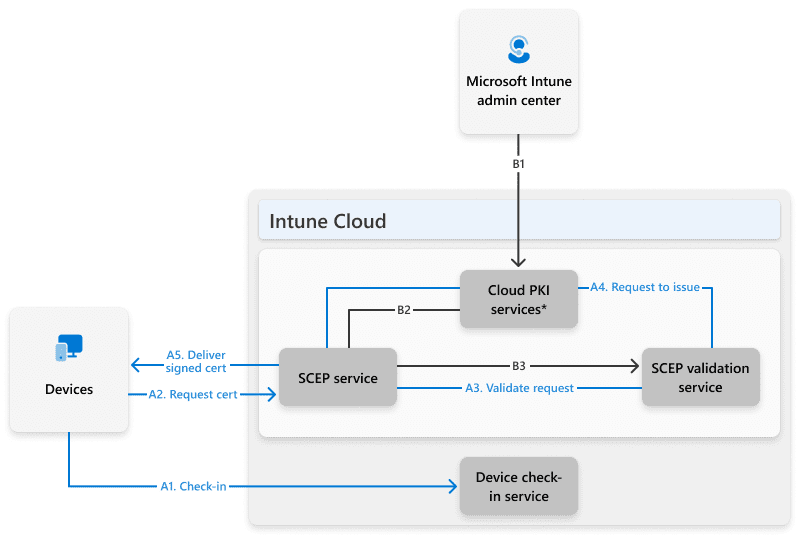
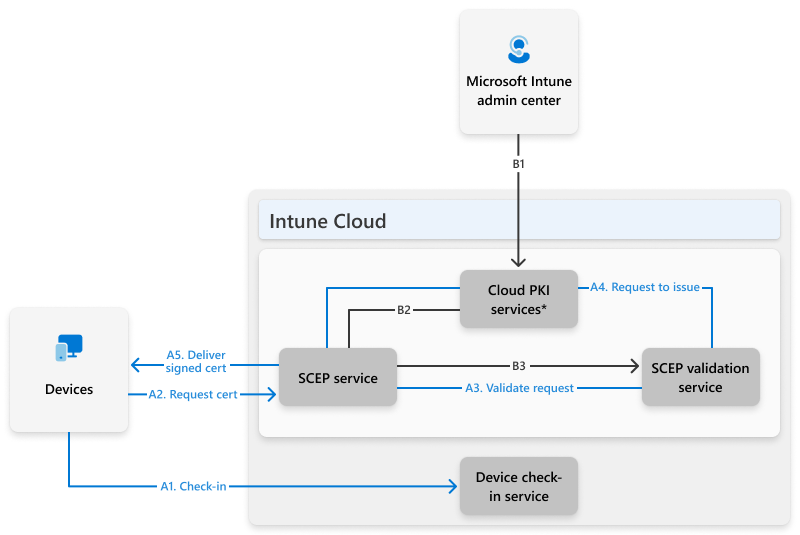
Certificate Enrollment Flow (End‑to‑End)
The actual certificate issuance flow is fully automated:
Certificates are periodically replaced instead of renewed, reducing private key reuse.
Security and Key Protection
Licensed Cloud PKI tenants use Azure Managed HSMs, providing:
- Non‑exportable private keys
- FIPS 140‑2 Level 3 compliance
- Strong tenant isolation
Important: CAs created during trial periods use software‑backed keys and can’t be converted to HSM‑backed later.
SCEP Profiles as Certificate Templates
Cloud PKI does not use AD CS certificate templates. Instead, the Intune SCEP profile defines certificate policy, including:
- Key length and hashing algorithm
- Extended Key Usages (EKUs)
- Subject and Subject Alternative Names
- Certificate lifetime
This design enforces stricter security than legacy NDES deployments.
Bring Your Own CA (BYOCA)
Organizations can anchor Cloud PKI to an existing private root CA while using a cloud‑hosted issuing CA. This allows gradual migration without fully replacing legacy PKI.
Monitoring, Reporting, and Revocation
The Intune admin center provides visibility into:
- Issued certificates
- Expired and revoked certificates
- Manual revocation
- Hosted CRL endpoints
Known Limitations
- Maximum 6 CAs per tenant
- No Linux certificate issuance
- Limited template customization
- Certificates are replaced, not renewed
Final Thoughts
Microsoft Intune Cloud PKI dramatically simplifies enterprise certificate management while aligning with modern Zero Trust principles. For cloud‑first Intune environments, it represents a fundamental shift in how PKI can be delivered securely and at scale.

Antonio Rennvick is an IT Infrastructure Manager with 15+ years running enterprise Active Directory, Microsoft 365, and Azure environments. He’s Microsoft certified (AZ-104, MS-102) and writes Core365 Cloud to share what actually works in production—PowerShell automation, AD deep dives, and security hardening drawn from real-world work, not test labs.